Strokes is a desktop writing app for macOS and Windows for people who care about words.
Most writing software makes you pick a side: keep your files on your own computer and give up the AI, or use the AI and hand your files to somebody else's server. Strokes does both. Your documents are files in folders on your machine, and you can write, edit and export with no internet connection. Page view or pageless, projects and folders, the blocks you need (headings, lists, tables, images, code) and a version history kept on your device.
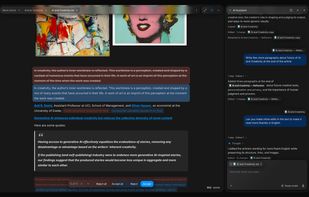
Beside the document sits a personal assistant. Ask about any passage without leaving the page. Attach files so it reads them first, have it browse the web and answer beside your draft, create an image for the document, ask it to polish and finalize a draft or to review it. Select text and press Cmd+K to ask for a change in place. Every edit it proposes appears in your text as a suggestion you accept or reject; nothing changes silently. For bigger jobs, agent mode works across your project step by step and shows each step.
Import Word, Markdown, plain text and Notion exports; export to PDF, Word, EPUB, Markdown, plain text and HTML; share a document as a public read-only link. Strokes never trains AI on your writing.
Free plan with the assistant and web research included; Plus ($9/month) adds encrypted cloud backups, external connections, image creation and 5x the usage; Pro ($29/month) adds Deep mode, multi-agent mode and 15x.







 Happy Vibes



No comments or reviews, maybe you want to be first?