SSHTermaq is a modern SSH client for people who know PuTTY. It keeps PuTTY's settings and adds a workspace: tabs, split panes and a built-in file manager.
EVERYTHING PUTTY DOES • PuTTY-style settings for every session, PuTTY keyboard modes and PuTTY's command-line options • PuTTY .ppk keys (v2 and v3), OpenSSH and PEM keys, Pageant and the Windows OpenSSH agent • One-click import of your PuTTY sessions, default settings and trusted host keys, from the registry or a .reg file, and of the hosts in ~/.ssh/config
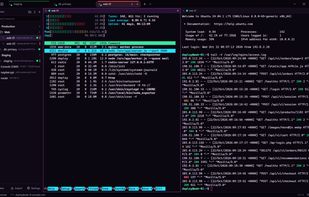
A MODERN WORKSPACE • Tabs and split panes, with input broadcast to all panes • Sessions in folders with colours, notes and search • Command palette, quick connect and configurable shortcuts • Your tabs and splits come back at the next start • 15 app themes, 30 terminal colour schemes and a scheme editor
A FILE MANAGER BUILT IN • An SFTP panel beside any SSH terminal, on the terminal's own connection: no second login • A two-pane file manager: this PC on the left, the server on the right, the transfer queue below • Drag and drop from Explorer, resume of interrupted transfers, overwrite and rename questions • Edit a server file in your own editor; it is uploaded on every save • Folder sync with a preview, file search on the server, bookmarks and permissions • Falls back to SCP on routers and other servers without SFTP
TUNNELS, PROXIES AND MORE • Local, remote and dynamic (SOCKS) port forwarding, agent forwarding and X11 forwarding • Jump hosts, and SOCKS, HTTP and Telnet proxies • Telnet, Rlogin, Raw TCP and serial ports (COM ports with all line settings) • Session logging, PuTTY-compatible character sets, 2FA (keyboard-interactive) logins • Saved passwords are encrypted for your Windows account (DPAPI) • ssh://, sftp://, scp:// and telnet:// links open in SSHTermaq
SSHTermaq is free and open source (MIT licence). It is not affiliated with the PuTTY project.







 Pavel Akulov


No comments or reviews, maybe you want to be first?