




SSH Tunnel Manager for macOS
Like
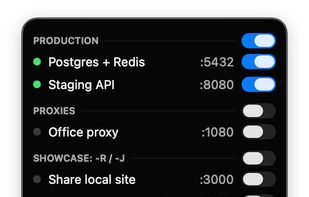
SSH Tunnel Manager is a free, open source menu bar app for macOS that manages SSH port forwarding. You set up your tunnels once, toggle them on or off from the menu bar, and the app reconnects them automatically when the connection drops.

Cost / License
- Free
- Open Source (MIT)
Application type
Platforms
- Mac



Features
SSH Tunnel Manager for macOS News & Activities
Highlights All activities
Recent activities
 Paul added SSH Tunnel Manager for macOS as alternative to RelayBar
 0fuz added SSH Tunnel Manager for macOS as alternative to Core Tunnel and sshuttle
 0fuz added SSH Tunnel Manager for macOS as alternative to WindTerm
 0fuz added SSH Tunnel Manager for macOS as alternative to SSH Tunnel Manager
 0fuz added SSH Tunnel Manager for macOS as alternative to Secure Pipes
- 0fuz thinks No registration required is a important feature of SSH Tunnel Manager for macOS
- 0fuz added SSH Tunnel Manager for macOS
 0fuz added SSH Tunnel Manager for macOS as alternative to Termius, SSH Pilot, WebSSH - SysAdmin Tools and Oysape


SSH Tunnel Manager for macOS information
Developed by
0fuzLicensing
Open Source (MIT) and Free product.Written in
Alternatives
11 alternatives listedBadge
Get an embeddable badge for SSH Tunnel Manager for macOSSupported Languages

AlternativeTo Categories
Network & Admin, System & Hardware, DevelopmentGitHub repository
- 46 Stars
- 5 Forks
- 0 Open Issues
- Updated
No comments or reviews, maybe you want to be first?