SpaceSharp is a fast, open-source disk space analyzer for Windows that helps you see exactly where your storage space has gone.
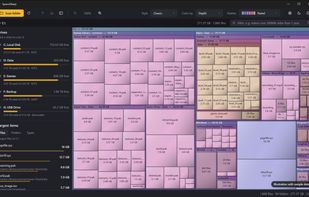
Inspired by classic tools such as SpaceMonger, SpaceSharp scans an entire drive or individual folder and displays its contents as an interactive treemap. Every file and folder is represented by a box sized according to the amount of space it uses, making large files and storage-heavy folders immediately visible.
The map can be freely explored by zooming, panning and double-clicking folders to move deeper into the directory structure. SpaceSharp supports six different map styles, multiple color palettes, light and dark themes, and coloring by either folder depth or file type.
Powerful filtering makes it easy to find specific files. Searches can include names, extensions, file types, file sizes and age, with queries such as "videos over 500MB", "older than 2 years" or "*.iso". Matching files can be selected together and moved to the Recycle Bin directly from the application.
A side panel provides an overview of available drives, storage usage, the largest files and folders, and disk usage grouped by file type.
Other features include:
• Fast parallel directory scanning
• File size or actual size-on-disk measurement
• Optional hard-link detection to avoid double counting
• Hidden and system file support
• Multiple file selection
• Largest files and folders overview
• Eight color palettes, including a color-blind-safe palette
• Six treemap visualization styles
• Light, dark and Windows-matched themes
• Mouse-wheel zooming and smooth folder navigation
• Detailed file information on hover
• Direct access to files and folders in Windows Explorer
• Safe deletion through the Windows Recycle Bin
• Per-monitor DPI and long-path support
• Configurable scanning, appearance and safety settings
SpaceSharp is available for 64-bit Windows 10 and Windows 11. It can be installed normally, installed per-user without administrator rights, or used as a standalone portable executable.
The project is open source and released under the MIT License.







 ClearanceClarence added SpaceSharp as alternative to WizTree, WinDirStat and SpaceMonger
 ClearanceClarence


No comments or reviews, maybe you want to be first?