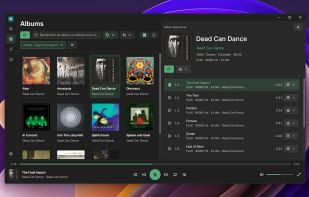
Soliton is a native audio library player built in Rust with GPUI. It indexes your local music collection and presents it in a responsive desktop interface, with rich metadata, album artwork, multiple editions, and playback on local or network devices.
Soliton plays the albums and tracks of its library: add your music folders as sources, and everything is browsed and played from there. It is not a standalone file player: files opened from a file manager or dropped onto the window are not played directly.
Your Music, Kept Local
Browse music from multiple folders, external drives, or mounted network shares in one library. Soliton reads metadata and artwork from your files and stores its database and caches separately. Your music files, tags, and embedded artwork remain untouched.
Background indexing and filesystem monitoring keep the library up to date. When a source goes offline, its albums stay in your library and are marked unavailable until it returns.
Key Features
- Album and Artist Browsing: Explore grid or list views, open album details, and browse compilations under Various Artists.
- Multiple Editions: Group matching album editions and put the best available edition first.
- Search and Filters: Search regardless of case or accents. Filter by genre, period, artist, format, or quality, and sort by artist, title, year, or recent additions.
- Playback and Queue: Use a persistent player bar, Now Playing, fullscreen mode, shuffle, repeat, manual playlists, and an editable queue.
- Local and Network Outputs: Choose a local audio device (Bluetooth included), or play to DLNA / UPnP and Google Cast receivers.
- Desktop Integration: On Windows, use media keys, system media controls, taskbar thumbnail controls, and the notification area, and configure closing behavior and automatic startup. On Linux, use media keys and the desktop media panel through MPRIS.
- Personalization: Choose English or French, system/light/dark appearance, accent color, artwork size, and the application icon (on Linux, for archive installations only).
Tested formats include WAV, FLAC, MP3, AAC-LC/M4A, ALAC, Vorbis, and AIFF.





 EU



 Carlton2001 added Soliton as alternative to MusicBee, foobar2000, AIMP, Clementine and 10 more

 Carlton2001


No comments or reviews, maybe you want to be first?