SnipToss icon
SnipToss icon

SnipToss

 Like

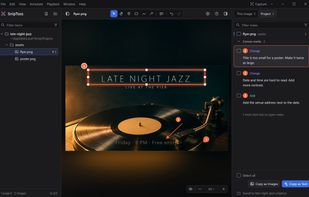
SnipToss is a free tool for reviewing what AI makes. Draw a pin, box or arrow on an image, a video or any part of your screen, write what should change, and hand the notes back.
SnipToss screenshot 1

Cost / License

  • Free
  • Open Source (MIT)

Application type

Since

  • New

Updated

  • Updated Nov 2026

Platforms

  • Windows
  • Mac
  • Google Chrome
0likes
0articles
Save

Features

Features

Highlights All activities

SnipToss News & Activities

Recent activities

SnipToss information

AlternativeTo Category

Photos & Graphics

GitHub repository

  •  0 Stars
  •  0 Forks
  •  1 Open Issue
  •   Updated  
View on GitHub

Popular alternatives

View all
SnipToss was added to AlternativeTo by MoyGoldenAge on and this page was last updated .

No comments or reviews, maybe you want to be first?

What is SnipToss?

Telling an AI what's wrong with what it made takes a paragraph. Showing it takes a few seconds with SnipToss.

SnipToss for Windows and SnipToss for Mac are free, open-source (MIT) desktop apps for the images and videos your coding agent makes. Mark what's off with a pin, box, arrow or pen, comment on a moment or a time range in a video, and write what should change. Notes are saved as plain files in your project, with positions and a snapshot, so Claude Code, Codex or any agent that reads local files can act on them. Copy as Text hands them over in one paste; Copy as Images makes one picture per note for web-based AI. Screen capture works on anything on your screen.

SnipToss for Chrome is a free browser extension: capture a web page or your whole screen, mark it up, press Enter, and paste one image with numbered notes into ChatGPT, Claude or any AI. Nothing is uploaded and there's no account.

Made by one developer, MoyGoldenAge. The Windows and Mac apps are open source (MIT); the Chrome extension is free.