Snipmunk icon
Snipmunk icon

Snipmunk

 Like

Free, offline screenshot clipboard for Windows: capture many, annotate, copy all at once. Plus text recognition, quick redact, screen recording and step-by-step guides. No account, no cloud. ~85 MB RAM.
Snipmunk screenshot 1

Cost / License

  • Free
  • Open Source (MIT)

Since

  • New

GitHub

  • GitHub stars: 12

Platforms

  • Windows
0likes
0articles
Save

Features

Properties

Features

Highlights All activities

Snipmunk News & Activities

Recent activities

Snipmunk information

AlternativeTo Category

Photos & Graphics

GitHub repository

  •  12 Stars
  •  0 Forks
  •  1 Open Issue
  •   Updated  
View on GitHub
Snipmunk was added to AlternativeTo by Paul on and this page was last updated .

No comments or reviews, maybe you want to be first?

What is Snipmunk?

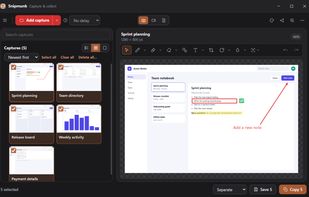
A free, open-source screenshot clipboard for Windows: capture many, mark them up, then paste all of them, or only the ones you select, in one go. Plus text recognition, quick redaction, screen recording and step-by-step guides. Offline, no account, no telemetry.

Features:

📷 Screenshots

  • Rectangle, window, full screen and freeform capture, with a delay, started with Ctrl+Alt+PrintScreen.
  • Every capture lands in one list that survives restarts.
  • Annotate: pen, highlighter, shapes, arrows, emoji, text, crop, rotate, blur, undo.
  • Copy the selected captures separately, stacked or as a grid, or drag them out as files.
  • Save as PNG, JPEG, WebP, BMP or ZIP; print; share; search by name and by the text in the picture.

🔤 Text recognition and Quick redact

  • Copy all text, select text on the picture, or copy a table.
  • Quick redact covers e-mail addresses, phone numbers, card numbers, IBANs, passwords and your own words.
  • Copies and exports have the covered pixels really replaced; you can also erase them from the kept picture.
  • Runs on your computer with Windows' own text recognition. Always check the result.

🎥 Screen recording

  • Record an area, a window or the full screen with system sound, microphone and a webcam bubble.
  • Cursor highlight and click effects, adjustable after recording.
  • Trim and split; export MP4 or GIF, in the shape you need (16:9, 9:16, 1:1).
  • Copy or share the video; keep it as a .snpr project; interrupted recordings can be recovered.

📄 Step-by-step guides

  • Every click becomes a step with a picture and an automatic text. Text typed into password fields is never stored.
  • Edit steps; add text, images and tables; callouts, spotlight and magnifier.
  • Templates with cover designs and contents, edited on real pages.
  • Export to PDF, Word, Markdown or HTML; save as a .snpd file.
  • Quick redact a whole guide before you share it.