SnapMark by SadlyBear icon

SnapMark by SadlyBear

 Like

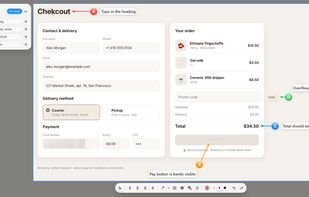
Screenshots that explain themselves: A-B-C markers with comments, one-Ctrl+V sharing to any chat, screen recording, OCR and scrolling screenshots.
SnapMark by SadlyBear screenshot 1

Cost / License

  • Free
  • Open Source (MIT)

Application type

Since

  • New

Updated

  • Updated Nov 2026

Platforms

  • Windows
  • Mac  macOS 11 or later. Recording computer audio requires macOS 13+. Not notarized yet: right-click the app → Open on first launch.
  • Linux  Full support on X11. On Wayland, screen recording is not available and global hotkeys are set via system shortcuts (snapmark --region).
0likes
0articles
Save

Features

Properties

Features

Highlights All activities

SnapMark by SadlyBear News & Activities

Recent activities

SnapMark by SadlyBear information

AlternativeTo Category

Photos & Graphics

GitHub repository

  •  0 Stars
  •  0 Forks
  •  0 Open Issues
  •   Updated  
View on GitHub
SnapMark by SadlyBear was added to AlternativeTo by Handmade-Cg on and this page was last updated .

No comments or reviews, maybe you want to be first?

What is SnapMark by SadlyBear?

SnapMark is a free, open-source screenshot and screen recording tool for Windows, macOS and Linux, built for explaining things: bug reports, instructions, design feedback and support.

Mark up a screenshot with A, B, C markers and write a comment for each one. Comments can be drawn right on the image, and a whole series of screenshots with all their comments is copied with one Ctrl+C. Paste it into Telegram, Slack, Teams, Word or any chat, and the images and the text arrive together.

Features: • A-B-C markers with comments, arrows, shapes, text, highlighter and pen • Screenshot series: collect several shots and copy them all at once • Step-by-step guide in one hotkey: every click becomes a screenshot with a marker and an arrow • Text recognition (OCR): select and copy text right on the picture, offline • Blur and pixelate to hide passwords and personal data • Scrolling screenshots of long pages, documents and lists, with sticky headers and floating buttons handled • Pin a screenshot on top of other windows • Screen recording to MP4, MKV, WebM or GIF with microphone and system audio • Click highlights, shortcut keys and a webcam bubble for tutorial videos • Trim recordings and export a clip as GIF • Clean macOS-style interface with light and dark glass themes • Available in English, Russian, German, French, Italian and Spanish

No account, no ads, no telemetry. MIT license.