

sitecue icon
sitecue icon

sitecue

 1 like

A side panel Chrome extension and web app for taking notes while browsing. Attach notes directly to any URL so they reappear on your next visit, review your logs, and write drafts for blogs or social posts.
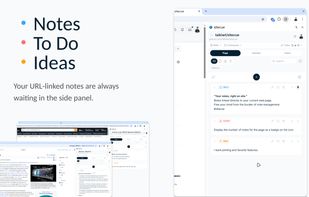
Chrome extension screenshot 1

Cost / License

  • Freemium (Subscription)
  • Open Source (MIT)

Application type

Since

  • Since 2026

Updated

  • Updated Nov 2026

Platforms

  • Online
  • Software as a Service (SaaS)
  • Google Chrome
  • Brave
1like
0articles
Save

Features

Properties

Features

Highlights All activities

sitecue News & Activities

Recent activities

sitecue information

  • Developed by

    JP flagtaikiwt
  • First released

    2026
  • Licensing

    Open Source (MIT) and Freemium product.
  • Pricing

    Subscription that costs $5 per month + free version with limited functionality.
  • Written in

  • Alternatives

    23 alternatives listed
  • Badge

    Get an embeddable badge for sitecue
  • Supported Languages

    • English
    • Japanese

AlternativeTo Category

Web Browsers

GitHub repository

  •  0 Stars
  •  1 Forks
  •  40 Open Issues
  •   Updated  
View on GitHub
sitecue was added to AlternativeTo by taikiwt on and this page was last updated .

No comments or reviews, maybe you want to be first?

Official Links

What is sitecue?

sitecue is a note-taking tool and text editor built for people who work, research, and write in the browser.

It combines two parts that work together:

  1. A Side Panel Chrome Extension for taking quick notes right on the websites you are viewing.
  2. A Web App for reviewing your notes, writing drafts for blogs or social media, and jumping back to your frequent websites.

Instead of clipping entire web pages into a separate app and forgetting about them, sitecue lets you leave your own notes directly on the website itself—so they automatically appear the next time you visit.

1. Chrome Extension: Take notes while viewing websites

Keep your notes right beside your active tab without switching apps or organizing folders:

  • URL & Domain-Linked Notes: Automatically shows notes and to-dos linked to the exact page (URL) or website (domain) you are viewing. A badge on the icon notifies you when a page has saved notes, and finished tasks can be marked as resolved to keep your list clean.
  • Quick Panel (Scratchpad, Commands & Links):
  • Note (Scratchpad): A free-form space for email drafts, AI prompts, or temporary text, regardless of which site you are on. Save to your Inbox or Diary in one click.
  • Command: Edit and copy multi-line commands or code snippets with auto-indentation.
  • Links: Register related URLs you use often on that site (like GitHub repos, staging servers, or spec docs) to open them in one click.
  • Daily Diary: Log daily thoughts and events with timestamps right from the side panel.
  • 3 Visual Markers & Filtering: Color-code notes into Info, Alert, and Idea. Quickly find what you need using type filters, hashtags, and keyword search.
  • Markdown & Code Highlighting: Write in standard Markdown with syntax-highlighted code blocks and one-click copy buttons.

2. Web App: Review your activity, write drafts, and launch sites

Use the web app as your home base when you want to step back and work on a larger screen:

  • Review Notes & Daily Logs: Browse through all the notes you have left across different websites, check your daily diary, and manage global "Inbox" notes that aren't tied to any specific URL.
  • Write Drafts (Studio): Turn your collected notes and ideas into structured drafts for blog posts, social media updates, or documentation.
  • Jump Back to Your Sites (Domain Activity): See which websites you use most actively and use your dashboard as a starting point to jump straight back to those pages.