





Sesori AI
Like
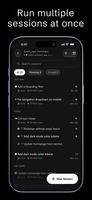
Desktop and iOS/Android app that tells you the moment an AI coding agent on your computer needs you, so you can answer from anywhere.




+4

Platforms
- Mac
- Windows
- Linux
- Android
- iPhone

Features

Highlights All activities
Sesori AI News & Activities
Recent activities
 AgentsRoom-Dev added Sesori AI as alternative to AgentsRoom
- Alexandru-Dochioiu added Sesori AI
- Paul updated Sesori AI
 Alexandru-Dochioiu added Sesori AI as alternative to Conductor, T3 Code, Happy Coder, Paseo AI and 8 more


Developed by
 Sesori AI
Licensing
Source Available (FSL-1.1-ALv2) and Free product.Alternatives
14 alternatives listedBadge
Get an embeddable badge for Sesori AISupported Languages
AlternativeTo Categories
AI Tools & Services, Development, Remote Work & EducationApple AppStore
- Updated
- 5 avg rating
GitHub repository
- 140 Stars
- 10 Forks
- 14 Open Issues
- Updated





No comments or reviews, maybe you want to be first?