SecureDrive is a robust and reliable virtual drive encryption solution designed for users who prioritize data privacy, local performance, and functional certainty. In an era where cloud-based storage often leaves personal information vulnerable to third-party access or data breaches, SecureDrive offers a specialized alternative by keeping your most sensitive files locked within a secure, encrypted volume stored directly on your machine.
The core functionality of SecureDrive revolves around the creation of high-speed encrypted virtual disks. Once a volume is created and mounted, it appears in your system as a standard drive letter (like D: or Z:), allowing you to interact with your files just as you would with any physical hard drive or USB stick. You can drag and drop documents, run executable programs, or edit media files directly within the encrypted space. The encryption and decryption processes happen transparently in real-time; as soon as you unmount the drive, the data becomes an inaccessible, encrypted file that is virtually impossible to breach without the correct credentials.
Built with a focus on system-level utility, SecureDrive avoids the complexities of AI-driven agents or forced cloud synchronization. Instead, it provides a "set it and forget it" experience for users who need a dedicated space for private documents, financial records, or proprietary project files. The software is optimized for the Windows desktop environment, ensuring that the encryption overhead does not impact your workflow or system responsiveness. Whether you are managing multiple rental property records, sensitive software source code, or personal family archives, SecureDrive provides a clean, professional interface to ensure your digital assets remain under your total control. It is a definitive tool for those who value the security of offline, local-first storage architecture combined with modern, industry-standard encryption protocols.
Key Features:
- Virtual Disk Encryption: Create secure, password-protected containers that appear as standard drives (e.g., Z: drive) when mounted.
- High-Speed Performance: Optimized for Windows to ensure minimal impact on read/write speeds during active use.
- ReadOnly Mode: A dedicated security feature that allows users to mount encrypted volumes in a "Read-Only" state to prevent accidental data modification or malware interference.
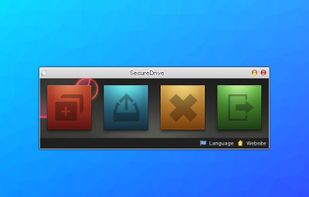
- Clean Interface: A lightweight WinForms-based UI designed for straightforward operation without a steep learning curve.
- Windows Integration: Fully compatible with modern Windows environments, functioning as a portable or installed utility.






 James Brian added SecureDrive as alternative to Nextcloud, Dropbox, Google Drive, MEGA and 47 more
 PDFZilla

No comments or reviews, maybe you want to be first?