Screen Fasting icon
Screen Fasting icon

Screen Fasting

 Like

Locks your iPhone into Assistive Access with a passcode you never learn, and emails it to you when your screen break is over.
Screen Fasting screenshot 1

Cost / License

  • Freemium (Subscription)
  • Proprietary

Application type

Since

  • New

Platforms

  • Online  Web app, no install. It generates a passcode and guides you step by step through setting it as your Assistive Access passcode on iPhone or iPad (iOS 17 or later). Not for Android.
0likes
0articles
Save

Features

Properties

Features

Highlights All activities

Screen Fasting News & Activities

Recent activities

Screen Fasting information

  • Developed by

    Unknown
  • Licensing

    Proprietary and Freemium product.
  • Pricing

    Subscription that costs up to $45 per year + free version with limited functionality.
  • Alternatives

    12 alternatives listed
  • Badge

    Get an embeddable badge for Screen Fasting
  • Supported Languages

    • English

AlternativeTo Category

Home & Family
Screen Fasting was added to AlternativeTo by shafayat kabir on and this page was last updated .

No comments or reviews, maybe you want to be first?

Official Links

What is Screen Fasting?

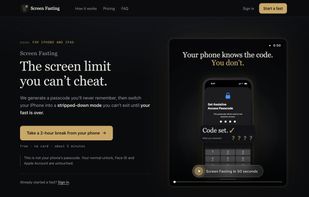
Screen Fasting is a screen time limit you can't talk yourself out of.

Most blockers fail for the same reason: you set the limit, so you can lift it. Screen Fasting takes you out of that loop. It uses Assistive Access, Apple's built-in simplified mode for iPhone and iPad, which keeps only the few apps you choose (like Calls, Messages and Maps) and hides everything else.

The trick is the passcode. Screen Fasting makes up a random code and guides you through typing it one keypress at a time, mixed in with decoy digits you delete again. Your fingers enter it, but you never see the whole number, so you can't remember it. Leaving Assistive Access needs that code, so the phone stays simple until the timer runs out. Then the code is emailed to you.

Setup runs in the browser and takes about five minutes, with a voice guiding every tap. There's no app to install, and it works on the same iPhone you're locking. Your normal unlock, Face ID and Apple Account aren't touched.

Free: 5 fasts a month, 2 to 8 hours each. Pro: unlimited fasts up to 30 days.

Screen Fasting Videos