
Schemity
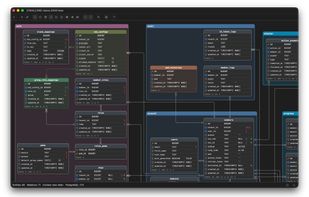
Offline desktop ERD tool for software engineers. Reverse engineers PostgreSQL, Supabase, MySQL, MariaDB, SQL Server and SQLite, stores every diagram as plain JSON you can commit to Git, and turns schema edits into a migration SQL diff you approve before it runs. One-time purchase.
Cost / License
- Freemium (Pay once)
- Proprietary
Application types
Platforms
- Mac
- Windows
- Linux
Features
Properties
- Privacy focused
- Lightweight
- AI-Powered
Features
- No Coding Required
- Works Offline
- Support for MarkDown
- Ad-free
- Dark Mode
- No registration required
- Database Management Tool
- SQLite
- ER Diagrams
Schemity News & Activities
Recent activities
workscove added Schemity as alternative to WorksCove ERD
bimsmarter added Schemity as alternative to BIM Workflow Generator- tbson updated Schemity
- tbson updated Schemity
- tbson added Schemity as alternative to Lucidchart
- tbson added Schemity
tbson added Schemity as alternative to ChartDB, Visual Paradigm, DBDiagram.io and DrawSQL
Schemity information
What is Schemity?
Schemity is an offline desktop ERD (Entity Relationship Diagram) tool for software engineers and database designers. It runs fully offline - no cloud, no account required - and stores every diagram as a plain local JSON file, so your schema design can live in the Git repository next to the code it describes. No limits on workspaces, diagrams, or tables.
Database Integration
- Connect to PostgreSQL, Supabase, MySQL, MariaDB, SQL Server, and SQLite, directly or through an SSH tunnel
- Reverse-engineer an existing database into a diagram, with foreign keys, constraints, and referential actions intact
- Re-sync on reopen pulls the live schema while existing entities keep their layout; new tables arrive ready to place, dropped ones disappear
- Diagram edits generate a migration SQL diff you review first - nothing runs against the database until you approve it
- Passwords stored in the OS keychain; SSH connections store only a reference to your private key
- Import SQL (CREATE TABLE statements or a full dump) or DBML; pure design mode needs no connection at all
Visual Design
- Entities, fields, indexes, check constraints, and named composite unique constraints
- 1:1, 1:N, N:N, and self-referencing relationships; N:N automatically creates the junction table with both foreign keys and a composite primary key
- Cardinality is derived from the foreign key's uniqueness rather than drawn by hand, and ON DELETE / ON UPDATE are configurable per relationship
- Views and materialized views render as read-only entities; PostgreSQL array types and check-constrained enum-like fields are shown as what they are
- Entity colors that relationship lines inherit, line hops where lines cross, custom waypoints, snap guides, and legends
Context Views and the Context Map
- A context view is a focused subset of the main diagram - a sub-diagram you arrange freely while the schema itself stays untouched, so the main view remains the single source of truth
- The Context Map renders each context view as a node and draws the dependencies between them, counting the foreign keys behind every arrow
AI, on Your Own Terms
- Bring your own key for OpenAI, Claude, Gemini, Grok, or DeepSeek, or run entirely locally through Ollama with no cloud at all
- The assistant edits the diagram directly: it creates and modifies entities and relationships, arranges the Context Map, and finds circular dependencies between contexts
Productivity
- Keyboard-first with vim-style navigation (h/j/k/l), full undo/redo, multi-tab editing, and copy/paste across diagrams
- Entity templates and realtime fuzzy search across both entity and field names
Export and Portability
- PNG, JPEG, and true-vector SVG that opens as editable artwork in Affinity Designer, Illustrator, and Inkscape
- SQL DDL for the whole diagram, a context view, a legend, or one entity
- DBML in and out, plus Mermaid erDiagram export that GitHub, GitLab, Notion, and Obsidian render natively
Available on macOS, Windows, and Linux.