Saisei icon
Saisei icon

Saisei

Lightweight and fast audio file player with waveform and keyboard navigation, multichannel support, and no data collection. Supports all major formats.
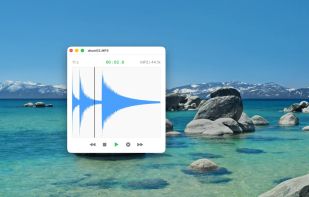
Saisei screenshot 1

Cost / License

  • Pay once
  • Proprietary

Platforms

  • Mac
1like
1comment
0articles

Features

Properties

  1.  Lightweight
  2.  Privacy focused

Features

  1.  Works Offline
  2.  Lossless Audio
  3.  No registration required
  4.  No Tracking
  5.  Ad-free
  6.  Keyboard Navigation
  7.  Support for Keyboard Shortcuts
  8.  Drag and Drop
  9.  Waveform

Saisei News & Activities

Highlights All activities

Recent activities

  • 2xkjcpsqsy rated Saisei  

    Simple and super fast interface, starts up in under a second!

  • 2xkjcpsqsy liked Saisei
  • App icon
    POX added Saisei as alternative to foobar2000, AIMP, Clementine and MusicBee + 47 similar activities
  • POX added Saisei

Saisei information

  • Developed by

    JP flagOliver Grimm
  • Licensing

    Proprietary and Commercial product.
  • Pricing

    One time purchase (perpetual license) that costs $10.
  • Alternatives

    50 alternatives listed
  • Supported Languages

    • English
    • Chinese
    • German
    • Japanese
    • Spanish

Our users have written 1 comments and reviews about Saisei, and it has gotten 1 likes

Saisei was added to AlternativeTo by Paul on and this page was last updated .

Comments and Reviews

   
2xkjcpsqsy
0

Simple and super fast interface, starts up in under a second!

What is Saisei?

Lightweight and fast audio file player with waveform and keyboard navigation, multichannel support, and no data collection. Supports all major formats.

Features:

  • Autoplay: Open a file and it plays instantly.
  • Waveform Display: View your audio waveform and click anywhere to seek.
  • Multichannel Support: Supports mono, stereo, and up to 8-channel audio.
  • File Format Support: WAV · AIFF · FLAC · MP3 · CAF
  • Keyboard Shortcuts: Extensive shortcuts for quick navigation within a file.
  • Drag & Drop: Open files via drag and drop, or use the File menu and keyboard shortcuts.
  • Markers: Press “M” to toggle a marker; press “P” to play from the marker.
  • Native Performance: Launches instantly and uses minimal CPU during playback.
  • Privacy: No data collection, no accounts, and no network requests.
