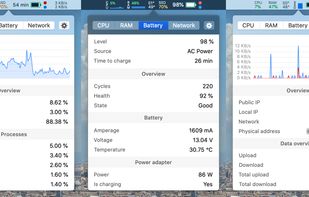
Menu bar tool for macOS shows real-time CPU, GPU, memory, disk, network, battery status, sensor data, fan speed, Bluetooth device info, multi-time zone clocks, customizable widgets, and historical graphs while ensuring privacy.

SafeFanControl is described as 'Native macOS app that lets you monitor temperatures and manage fan speeds on Apple Silicon and Intel Macs' and is an app in the os & utilities category. There are more than 10 alternatives to SafeFanControl for Mac, Windows, Linux, iPhone and Flathub. The best SafeFanControl alternative is Stats, which is both free and Open Source. Other great apps like SafeFanControl are MacThrottle, iStat Menus, Macs Fan Control and TG Pro.
Menu bar tool for macOS shows real-time CPU, GPU, memory, disk, network, battery status, sensor data, fan speed, Bluetooth device info, multi-time zone clocks, customizable widgets, and historical graphs while ensuring privacy.

Lightweight macOS tool that tracks thermal pressure and throttling, shows real time CPU temperature and fan speed, provides 10-minute history graphs, statistics for thermal states, and customizable notifications, all without requiring administrator privileges.

Advanced Mac utility with menubar monitoring for CPU, GPU, memory, disks, network, and sensors, including fan control, S.M.A.R.T status, Bluetooth battery tracking, weather, notifications, and deep customization. Combines multiple stats in a single view while prioritizing privacy.


System utility enabling manual control over fan speeds, real-time monitoring of temperatures and RPM, custom preset creation, support for third-party drives and Windows via Boot Camp, noise reduction features, compatibility with T2 chip models, and multilingual options.


Monitor and manage all internal Mac temperatures, enhancing longevity by ensuring components remain cool. Supports auto/manual fan speed adjustments and offers comprehensive diagnostics with local or email alerts. Secure and compatible with Macs from 2008 onward.


Displays macOS CPU thermal throttling, temperature, scheduler limit, available CPUs, and system thermal pressure with color-coded alerts. Offers real-time sensor graphs and at-a-glance hardware health feedback for both Intel and Apple Silicon Macs from the menu bar.


macOS menu bar utility written in SwiftUI that presents CPU, memory, disk, and network usage, plus Bluetooth battery levels, customizable Big Sur widgets, Dark Mode, and real-time sensor data. Open-source, lightweight, and compatible with Apple Silicon.

macOS and OSX tool showing real-time CPU, memory, network activity, fan speed, and temperature in the menu bar. Highly configurable, with customizable battery notifications, support for light or dark mode, open-source code, and ongoing community-driven updates.

XRG is an open source system monitor for Mac OS X. XRG allows you to monitor CPU activity, memory usage, battery status, machine temperature, network activity, disk I/O, current weather, and stock market data.


CPU Thermometer is one free CPU temperature monitor; it can help you monitor your computer CPU temperature in live time. Program can start with Windows start-up, and show live CPU temperature in your desktop tray icon, so you get this important system information at a glance.

Track Mac fan speed, target speed, minimum and maximum speeds, number of fans, and CPU or GPU temperature in real time from the Notification Center or Menu Bar using a compact widget designed to provide hardware stats without workspace clutter.