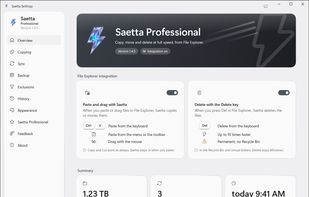
Saetta is a file copy utility for Windows that copies, moves and deletes files with its own copy engine. It takes over these operations from File Explorer: from the right-click menu or, when the integration is turned on, from Paste, Ctrl+V, drag and drop and the Delete key.
The engine detects the type of each drive and changes how it reads and writes. On SSDs many files are copied at the same time; on hard disks files are read and written as one ordered stream, so the disk does not thrash; on USB drives and SD cards fewer files run in parallel. The gain is largest with many small files: in the developer's published benchmarks (same PC, median of three runs), copying 20,000 files of 64 KB from SSD to SSD took 7.7 seconds with Saetta and 3 minutes 11 seconds with File Explorer, while with a few large files the two take a similar time. Locked or unreadable files are skipped and listed at the end instead of stopping the job, and jobs can be queued, paused and resumed. When files already exist in the destination, Saetta asks once for the whole job: replace, skip, or compare and decide file by file.
The free version also has Copy to and Move to with several destinations, fast permanent delete, exclusion filters by name, age and size, a job history, copying to and from phones over MTP, and an action when a job ends. The Professional version adds verification by hash (xxHash3, BLAKE3 or SHA-256), resume after a restart or power outage, folder sync with a preview, scheduled backups, checksum files, HTML and CSV reports, secure delete and a speed limit. Saetta has no ads, needs no account and collects no usage data.







 EU



 WumingDev


No comments or reviews, maybe you want to be first?