replaycut icon
replaycut icon

replaycut

Clip manager for the OBS replay buffer: trim replays from your phone, encode on the gaming PC with ffmpeg and your GPU, upload to your own storage and post the link.
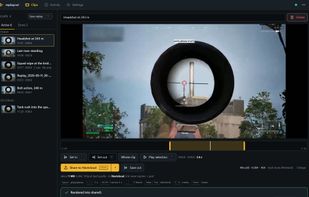
The clips page on the PC: the clip list on the left, the player with the in and out marks and the share row on the right.

Cost / License

Application type

Platforms

  • Windows  x64, Windows 10/11. Needs OBS Studio with the replay buffer enabled and ffmpeg/ffprobe on the PATH.
  • Linux  x64, one static executable with install.sh, desktop entry and systemd user unit. Hardware encoding via VAAPI. Under Wayland nobody can press the replay hotkey for you; enable OBS WebSocket instead.
0likes
0articles

Features

Properties

  1.  Privacy focused
  2.  Lightweight

Features

  1.  No Tracking
  2.  Works Offline
  3.  Support for 4K
  4.  No registration required
  5.  Ad-free
  6.  Non Destructive Editing
  7.  Hardware Accelerated
  8.  Dark Mode
  9.  Screen Recording
  10.  Record videos

replaycut News & Activities

Highlights All activities

Recent activities

replaycut information

AlternativeTo Categories

Video & MoviesPhotos & GraphicsSystem & Hardware

GitHub repository

  •  2 Stars
  •  1 Forks
  •  1 Open Issues
  •   Updated  
View on GitHub
replaycut was added to AlternativeTo by Dominic on and this page was last updated .
No comments or reviews, maybe you want to be first?

Official Links

What is replaycut?

replaycut runs next to OBS Studio on the gaming PC and watches the folder the replay buffer writes to. Every replay shows up on one page in the browser, which works the same on the PC, a laptop or a phone in the same network. Set in and out, choose the audio mix, landscape or vertical, give it a title, and share: the PC cuts and encodes the range with ffmpeg on the GPU (AMD, NVIDIA, Intel) at low priority, uploads it to Nextcloud, OneDrive, S3, WebDAV or YouTube - or keeps it as a file - and posts the link to Discord, Telegram or a webhook. Every share keeps the cut as its own file, so it can be rendered again later without the original recording. No account, no cloud of its own, no telemetry; new installations listen on this PC only until you let a device in. One executable with a tray icon and one-click updates, for Windows and Linux. Free software under AGPL-3.0. Built with Claude Code; the maintainer writes the specifications, reviews every change and tests every release on real hardware.

