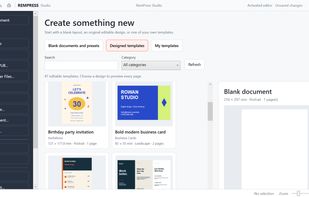
RemPress Studio is a Windows desktop publishing and design application for creating professional-looking printed materials, business documents and everyday designs. It combines easy-to-use editing tools, ready-made templates, flexible page layouts and printing features in one application.
Designed for small businesses, schools, churches, charities and home users, RemPress Studio makes it easy to create documents without needing complicated professional design software.
What Can You Create?
Flyers, leaflets and posters Business cards and brochures Newsletters and bulletins Restaurant menus and price lists Labels, stickers and certificates Invitations and event programmes Signs, notices and business documents
Key Features
Text Editing: Editable text boxes, fonts, colours, bold, italic, underline, highlighting, alignment, bullets, numbering and text effects. Images: Insert, crop, resize, rotate and position photographs and graphics. Shapes & Elements: Add shapes, lines, decorative elements, dividers and frames with custom fills and outlines. Page Layout: A3/A4 sizes, portrait/landscape orientation, rulers, margins, guides, grids and snapping. Object Editing: Group objects, adjust stacking order, duplicate, copy, paste, undo and redo. Tables: Create tables and edit cell text and formatting. Templates: Customise ready-made designs for business and personal use. Colours: Built-in colour picker, custom palettes and colour formatting. Printing & Export: Windows printer support, print settings and PDF export. Document Management: Create, save, reopen and edit projects.
Microsoft Publisher (.pub) Support
RemPress Studio includes a built-in Microsoft Publisher importer. Open supported .pub documents without Publisher installed and continue editing supported text, images and layout elements. Import accuracy depends on the original document's complexity and fonts.
Free Viewer
A free viewing mode allows users to open, view, print and export supported Publisher documents to PDF before purchasing the Editor.
One-Time Purchase
The full Editor is available through a one-off licence purchase, with no ongoing subscription required.
RemPress Studio is ideal for anyone wanting an accessible Windows desktop publishing application, whether creating new designs or continuing to work with existing Publisher documents.







 Paul added Rempress Studio as alternative to Korva - Desktop Publisher, PubHarbor, Save Your PUB Files, Swift Publisher and 7 more
 Jovi added Rempress Studio as alternative to PubKeep

 swootsy ltd


No comments or reviews, maybe you want to be first?