Korva is a Microsoft Publisher alternative for Mac, Windows and Linux. It opens the Publisher .pub files you already have, lets you edit every page, and prints them or exports a print-ready PDF. Microsoft retired Publisher on October 1, 2026 and never made a Mac version; Korva keeps those files usable on any computer.
Open .pub files without Publisher
• Opens .pub files from Publisher 2003 to 2021 and Microsoft 365 as editable pages: text boxes, pictures, tables and linked stories sit where Publisher put them
• Works on a copy, so the original .pub file is never changed
• An import report for each file lists replaced fonts, low-resolution pictures and text that no longer fits, with a link to the page
• The Rescue Center checks a whole folder of .pub files and converts the safe ones from PUB to PDF in one batch
Familiar to Publisher users
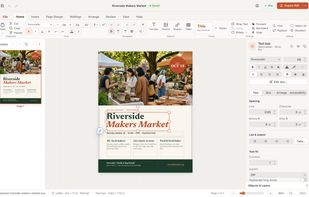
• A ribbon with File, Home, Insert, Page Design, Mailings, Arrange, Review, View and Help tabs, page thumbnails and a Format pane
• Linked text boxes, columns, drop caps, WordArt, styles, bullets, tables, shapes, calendars, and pictures with cropping and text wrap
• Master pages, page numbers, headers and footers, color schemes and a scratch area beside the page
• Spelling check, Find and Replace, Design Checker and 100 levels of undo
• 21 templates: church bulletins, newsletters, flyers, posters, menus, tri-fold brochures, business cards, invitations, certificates and address labels
Print, PDF and mail merge
• PDF for email, press-ready PDF with crop marks and registration marks, CMYK or grayscale output, and PNG or JPEG pictures
• Booklet PDF with pages ordered for folding and stapling
• A preflight check before every export, and Pack and Go to bundle the document, PDF and pictures for a print shop
• Mail merge from an Excel or CSV list into letters, certificates and Avery 5160, 5161 and 5163 label sheets
Private and offline
Everything runs on your computer. No account, no subscription, no ads, and nothing is uploaded.
Pricing
Free to download: open and edit any .pub file and export your first complete project without a watermark. Korva Pro is a one-time $49 license for unlimited exports, editable .kva saves, mail merge, master pages, Pack and Go and batch conversion, with a 14-day refund.
Good to know
Korva saves to its own editable .kva format and exports PDF; it does not save back to .pub. The interface is available in English and Polish.
Get Korva from korva.korsund.com or the Microsoft Store. The site also has a free PUB to PDF converter and PUB viewer that run in the browser without uploading the file.







 krogy added Korva - Desktop Publisher as alternative to PubStudio
 stephen-wheelhome-co-uk added Korva - Desktop Publisher as alternative to SRW Publisher
 Paul added Korva - Desktop Publisher as alternative to Rempress Studio


 Korva


No comments or reviews, maybe you want to be first?