RAG Assistant for Zotero is a desktop app that lets you semantically search your Zotero library and acts as a library assistant.
The app helps you narrow down your literature search and find what to read more quickly. It does that through both classic retrieval and retrieval-augmented generation (RAG), which can run on a local model. With a local model, or with no model at all, your documents and queries never leave your computer. This makes the app suitable for Zotero users working with sensitive documents they should not share with cloud models.
ON-DEVICE SEMANTIC SEARCH
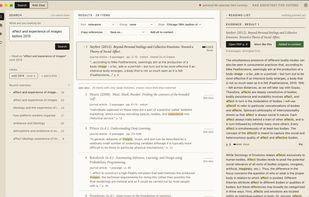
You start by indexing the full text of the PDFs in your Zotero library, which is stored in a vector database on your computer. You can then search by meaning and by keyword at once, and narrow the search with metadata filters. If you write a year, an author, a tag or a collection into your query, the app turns it into a filter you can see and remove.
REFERENCE DESK
Your results are shown as a ranked bibliography. Each item shows the passages from your library that match your query, with their page numbers, and opens in Zotero at that page. From any item you can follow its references and the works that cite it outside your library, through the Semantic Scholar integration. The reference desk works without a language model.
RAG CHAT
Once you've narrowed down your search, you can add items and their passages to a context folder, then switch to RAG Chat to ask more specific questions about them. The model answers from those items only. RAG Chat requires a language model, which can be a local model (through Ollama or LM Studio) or a cloud provider with your own API key.
SOURCE ATTRIBUTION
The app keeps track of sources throughout your workflow, so you can always trace where a particular snippet of information comes from. Every passage is cited to its document and page, and every answer in RAG Chat lists its sources beside it.
RETRIEVAL ENGINEERED FOR RESEARCH
The search is designed to deliver diverse and consistent results. It combines dense vector retrieval with keyword search (BM25), merges the two with reciprocal rank fusion, and reranks the passages with a cross-encoder. Items are then ranked by their best passage. No item can take more than eight places in the candidate pool, so one long paper cannot fill the list, and overlapping passages from the same item are dropped. Relevance is shown as strong, good or weak rather than as a percentage. These labels are calibrated on a test set of 101 queries, so they mean the same thing from one search to the next. Weak matches are set apart under "see also" instead of padding the list.






 EU


 Alexander Hepburn added RAG Assistant for Zotero as alternative to ScholarThread, PapersGPT, Anara, Gemini Notebook and 2 more

 Quiet Signals Lab


No comments or reviews, maybe you want to be first?