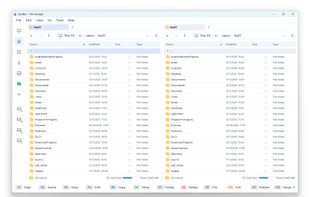
A two-pane file manager built with Rust and egui/eframe, with F1–F12 keyboard controls, tabs, and background copy, move, and delete operations.
Browsing
🪟 Two panes with tabs — or one pane, switch with F12.
🧭 Easy navigation — clickable path bar, back and forward, quick links to Desktop, Downloads, Pictures and your drives in the sidebar.
🔍 Search — filter the current folder by name (Ctrl+F) or find files anywhere, even by the text inside them (Alt+F7).
📊 Columns you choose — name, date, size, type and more; sort by clicking a column.
💾 Remembers your tabs — everything reopens the next time you start Quokka.
Looking at files
⚡ Quick view (Ctrl+Q) — the other pane shows the picture or text file under the cursor. Flip through photos with the arrow keys.
👁️ Viewer (F3) — open pictures and text files without leaving Quokka; zoom in and out.
📝 Edit — F4 opens your editor (Notepad by default), Shift+F4 a simple built-in one.
Working with files
📁 Copy, move, delete — with F5, F6, F8, Ctrl+C / Ctrl+V or drag and drop, also to and from other programs. Big jobs run in the background, and you can pause or cancel them.
↩️ Undo (Ctrl+Z) — bring back deleted files, undo a move or a rename.
🏷️ Rename many files at once (Ctrl+M) — see the new names before anything changes. More below.
🖼️ Convert pictures (Ctrl+Shift+E) — to JPEG, PNG, WebP and other formats, many at once.
🗜️ ZIP archives — open them like folders and take out what you need; pack files into a new ZIP.
📏 Folder sizes (Alt+Enter) — see how much space each folder takes. More below.
🎯 Select by pattern — for example, all *.jpg files at once (Ctrl+S).
Fits into Windows
🖱️ The usual Windows menu and Properties — every command you know from Explorer is one click away.
💽 Drives and devices — free space at a glance; USB sticks, memory cards and phones show up as soon as you plug them in.
🌐 Servers (Ctrl+K) — open folders on SFTP and FTP servers like ordinary ones. Passwords are stored safely by Windows.
📌 Tray icon — keep Quokka running in the background.
⌨️ Your own shortcuts — change any keyboard shortcut in Settings.
⬆️ Updates itself — tells you when a new version is out and installs it in one click.








 Natterum added Quokka File Manager as alternative to OneCommander, Dolphin File Manager, Double Commander, Files and 4 more





No comments or reviews, maybe you want to be first?