


Qubes OS
130 likes
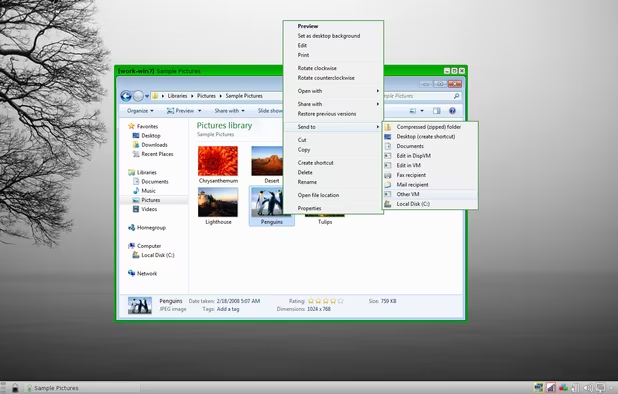
Qubes is an open source operating system designed to provide strong security for desktop computing.
Cost / License
- Free
- Open Source
Application typeApplication types
Platforms
- Linux
- Fedora
- Xen

Features
Qubes OS News & Activities
Highlights All activities
Recent News
- Fla published news article about Qubes OS
- Paul published news article about Qubes OS
- Ola Johansson published news article about Qubes OS


Recent activities
 Lucas Gabriel added Qubes OS as alternative to Prototype Linux
- M T liked Qubes OS
 alessandropatane added Qubes OS as alternative to Linux PataOS
 Korbs added Qubes OS as alternative to Mainstream OS
 rhY added Qubes OS as alternative to Spaced Linux
- Oklonsica liked Qubes OS
 Paul added Qubes OS as alternative to Shadowfetch Linux






Featured in Lists



Into the Cyberverse
The ultimate list of apps/services for better Security, Privacy & Anonymity; Defense against Surveillance.
What sets this list apart is its commitment to authenticity:
No Sponsorship: Choices are made without commercial bias.
No Affiliate Links: Purely user-benefit-focused.
No Brand Deals: Independent and unbiased evaluations.
Strict criteria ensure the tools prioritize user welfare and software quality:
Opensource Preference: Prioritizing transparent and community-driven software.
Cross-Platform Availability: Emphasizing tools usable across multiple systems.
Active Development and Security Updates: Selecting only actively maintained tools with regular security enhancements.
Proven Track Record: Requiring a history of reliability and positive feedback.


Apps to keep your data private
Privacy is a far more serious concern than most people realize. Personal data could be used to steal your identity, and your money. It could also allow malicious people to track you or your loved ones and find opportune moments to do harm. Or on a simple level, it could be used to publicize information you just don't want to be public.
In an age where giving up your private info grants you access to some very helpful services and apps, it can seem impossible to protect that data. It is possible though. We've compiled a list of key services and apps that help you do just that.


The linux setup for everyone (freeware with GUI only and distro recommendations)
THIS LIST HAS BEEN DELETED DUE TO A BUG, SO IT MISSES SOME HONORABLE MENTIONS !
I've been using Linux for a year now. I do use CLI tool and the terminal but I'm super used to GUI and I do understand why you might don't want to bother with Terminal and stuff ! Here is my list of useful tools for beginners on Linux !
The same list for
macOS :
Windows 10 :
What is Qubes OS?
Qubes OS Videos
Qubes OS information
Developed by
 Qubes OS
 Licensing
Open Source and Free product.Rating
Average rating of 3.5Alternatives
205 alternatives listedNews
3 news article related to Qubes OSBadge
Get an embeddable badge for Qubes OSSupported Languages


Comments and Reviews
I have used Qubes OS as my primary desktop at home and work for four months, and believe it to be the most effective and reasonably secure operating system available. It can be a little fiddly to set up and use, and you do have to want to run Qubes OS, but after using it, every other operating system feels unsecure. I do not want my SSH keys, private documents, and photos in the same place where a browser or other networked software runs. Browsers are complex and serious flaws seems to be reported regularly for all browsers. I wonder how many flaws are not reported.
I love the ease of use of Tails, Windows 10, TrueOS, Fedora Xfce, and macOS. But their monolithic design (private information and connected applications together in the same environment) worries me. In a world where nothing is perfect, Qubes OS's use of Xen virtualisation seems like a reasonable, effective, and surprisingly easy-to-use approach for the technically inclined, especially given the alternatives. I'm just a guy, but Qubes OS makes me cautiously optimistic about my online privacy and security. Nothing is perfect, but Qubes OS goes above and beyond any other system that I know about.
On what hardware (CPU/Motherboard/GPU) combination did you get it to work?
Very slow and unusable and I have a powerful conputer 12GB ram and an i7 and Nvidia940m. I cant even use firefox and browse the web without it buffering for 5 minutes! Great concept of VMs for security but really buggy so unless they fix it im not using it. Linux Tails or Subgraph OS is a much better choice for me, or you can get Debian and get Virtualbox and run VMs that way.
There's probably something else wrong with your system. I have a i5 with just 4GB RAM and Qubes OS worked quite good at the time.
It's Security is great, and it's VM approach makes some weird (based on monolithic kernel views), but great, things possible
Its difficult to say Whonix is an alternative, because Whonix is the backbone of Qubes. Qubes is like Whonix squared! But if the user is only interested in occasional secure connections and operations, with only a bit of extra time and effort, Whonix is much simpler to set up and use. It also can be conveniently run on an optical disk or other disposable medium, like Tails. Qubes theoretically can be, but the trouble and inconvenience suggest otherwise. And just like Whonix is the backbone of Qubes, VirtualBox has been the backbone of Whonix. This has changed fairly recently however with Whonix virtual machines now being implemented with KVM. Subgraph OS comes the closest to a entire security-oriented Operating System meant to be used on a regular basis, but that project has been in "Alpha" release for a long time. As for Tails, there's very little one can do other than have private emails, conversations, and financial transactions. A never ending series of disposable Tails installations might be considered an "alternative". Pentesting OS's are an entirely different category, generally offensive rather than defensive security.
This system offers true answer to our daily needs in nowadays not so secure and private world. Due to compartmentalization of our everyday's activity it brings us several steps closer to decent privacy. That's not a geek-only OS. There's nothing difficult in it for general Linux user. Using every other system after this feels like drunk unprotected sex with total stranger. I used it for several month and the only serious (though understandable) downside I found is extensive RAM requirements. 8Gb is absolute minimum to fully appreciate true power of this system. Qubes OS is a must have if you want to control how and when your data used. With it you feel like you are in total control of everything happening in your digital life.
Qubes only installs on certain CPU and motherboard combinations. It's pretty unlikely it will work on your machine without extensive tweaking (and knowledge of the Linux command line), and there are no assurances it will work. Less than alpha in quality. 10/10 idea, 1/10 in compatibility. In operation? I have no idea. Ask someone who has managed to get it installed.
That is surprisingly common issue with Qubes OS. However, I had absolutely no trouble using it for several months. And I have probably cheapest and weakest system ever: i3-2100 on ASRock H61iCafe. The only serious downside of this system is extensive RAM usage. 8Gb I find absolute minimum for true comfort (3 or 4 Linux domains plus 1 Windows HVM domain simultaneously).
I believe Qubes OS to be the most effective and reasonably secure operating system available. It can be a little fiddly to set up and use, but after using Qubes OS, every other operating system feels dangerously unsecure. I do not want my SSH keys, private documents, and photos in the same place a browser runs. Browsers are complex, fallible, vulnerable software, and your privacy and security are only as good as your weakest link.