
Pybient icon
Pybient icon

Pybient

Intuitive Python code editor with project snapshots, side-by-side comparison, GUI-to-code features, a built-in AppImage compiler and various other compilers. Perfect for beginners and small to medium-sized projects. Just try it to find out more.
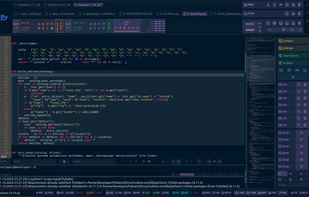
Main editor with code map, file tabs and snapshot bar

Cost / License

  • Pay once
  • Proprietary

Application type

Platforms

  • Linux  AppImage (x86_64), requires glibc 2.35 or newer (e.g. Ubuntu 22.04+)
0likes
0articles
Save

Features

Properties

  1.  Support for Themes
  2.  Lightweight

Features

  1.  Spell Checking
  2.  Live Preview
  3.  Dark Mode
  4.  File Versioning
  5.  No registration required
  6.  Autocompletion
  7.  Ad-free
  8.  Works Offline
  9.  No Tracking
  10.  Real time collaboration
  11.  Portable
  12.  Extensible by Plugins/Extensions
  13.  Syntax Highlighting
  14.  Python IDE

Pybient News & Activities

Highlights All activities

Recent activities

  • Pybient updated Pybient
  • Pybient A comment was removed from Pybient
  • Pybient liked Pybient
  • Pybient added Pybient
  • PyCharm icon
    Pybient added Pybient as alternative to PyCharm

Pybient information

  • Developed by

    Pybient
  • Licensing

    Proprietary and Commercial product.
  • Pricing

    One time purchase (perpetual license) ranging between $20 and $22.
  • Alternatives

    1 alternatives listed
  • Badge

    Get an embeddable badge for Pybient
  • Supported Languages

    • English
    • Polish
    • German
    • Arabic
    • Bulgarian
    • Bengali
    • Chinese
    • Spanish
    • Portuguese
    • Russian
    • Japanese
    • French
    • Hindi
    • Korean
    • Turkish
    • Italian

AlternativeTo Category

Development

Popular alternatives

View all
Pybient was added to AlternativeTo by Pybient on and this page was last updated .

No comments or reviews, maybe you want to be first?

Official Links

What is Pybient?

Pybient is an intuitive Python code editor and IDE with a reduced, focused workspace for code, projects, compiler tools and fast navigation.

Key features:

  • Snapshots of every project state with one click, including favorites and locked snapshots
  • Side-by-side comparison of the current file with any snapshot
  • Integrated terminal and log panel
  • Python environment manager for system Pythons and virtual environments
  • Built-in AppImage compiler to package your own Python apps
  • Code map, scope view, file tree and quick navigation
  • Day and night themes with a custom theme editor
  • User interface available in 41 languages

Pybient starts as a 30-day demo without an account. The full version is unlocked with a license file.