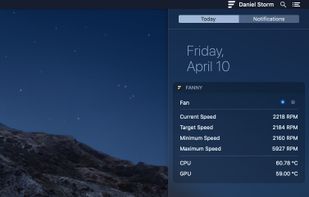
Fanny is a free Notification Center Widget and Menu Bar application to monitor your Macs fans.
Cost / License
- Free
- Open Source (MIT)
Platforms
- Mac

Pluto HUD is described as 'Pluto is a highly refined and customizable at-a-glance system monitor for your Mac. Keep track of what's going on behind the scenes without dropping what you're currently doing' and is an app in the os & utilities category. There are more than 50 alternatives to Pluto HUD for a variety of platforms, including Mac, Windows, iPhone, iPad and Linux apps. The best Pluto HUD alternative is HWiNFO (32/64). It's not free, so if you're looking for a free alternative, you could try HWiNFO (32/64) or Open Hardware Monitor. Other great apps like Pluto HUD are SpeedFan, Stats, MacThrottle and Sidebar Diagnostics.
Fanny is a free Notification Center Widget and Menu Bar application to monitor your Macs fans.

Status bar app for macOS that shows the amount of free disk space left on the hard drive.


The Remote Linux Monitor's graphical user interface is similar to and inspired by Gnome's System Monitor. All connections are made using a secure shell and there is no agent software to install on the remote server.


Monity is an advanced system monitor that takes place in macOS Today View and oversees component statistics.


Professional System Monitoring Utility designed for Mac.
xScan has been specifically designed to help you monitor the behavior and health of your Mac in a simple and straightforward manner. This is done in real time. No more needing to go ‘beneath the hood’ to find out all those.


eeectl is a tiny yet powerful program for Asus EEE PC 700 series, it runs on Windows® and allows you to control & overclock your EEE PC on the fly.
FullControl is a fun, and easy-to-use app that turns your iPhone or iPad into a remote control. So you can control your computer with a tap or flick of a finger.


MiniUsage displays various data like CPU usage, amount of network flow, battery status and process names which uses much CPU time in a menubar. It takes little space and can display various data, so it's suitable for notebook.


Using a database, it will show information about your SSD, such as the controller, processing tech, NAND type etc.


This compact utility displays real-time CPU, RAM and disk drives usage meters right on the taskbar notification area, or next to the system clock, that is always visible.


This is a Windows version of the Data LifeGuard Diagnostics. It will test WD internal and external drives. In additional, it can provide you with the model and serial of WD drives attached to the system.