

Plot Along icon
Plot Along icon

Plot Along

Want to plan a road trip with your friends? Plot Along provides a modern collaborative route planning experience on any device.
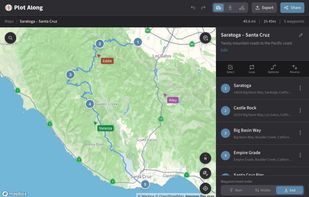
Collaborative route editing on desktop showing live cursors from people using the app on phone and tablet

Cost / License

  • Freemium (Subscription)
  • Proprietary

Platforms

  • Online
1like
0comments
0articles

Features

Properties

  1.  Privacy focused

Features

  1.  Route Planning
  2.  Dark Mode
  3.  No Tracking
  4.  Ad-free
  5.  Points of Interest (POI)
  6.  Works Offline
  7.  Nearby Search
  8.  Cycling
  9.  Hiking Maps
  10.  GPS Navigation
  11.  Driving directions

Plot Along News & Activities

Highlights All activities

Recent activities

Plot Along information

  • Developed by

    US flagPlot Along
  • Licensing

    Proprietary and Freemium product.
  • Pricing

    Subscription ranging between $4 and $59 per month + free version with limited functionality.
  • Alternatives

    18 alternatives listed
  • Supported Languages

    • English

AlternativeTo Categories

Travel & LocationSport & Health
Plot Along was added to AlternativeTo by motoroco on and this page was last updated .
No comments or reviews, maybe you want to be first?

What is Plot Along?

Plot Along is a multiplayer app for planning road trips with friends that delivers first class real-time collaboration features. Create and edit routes together with live cursors for everyone, share the plans with your travel group using a stable link you can update as much as you want, and enjoy a collaborative route planning experience unlike any other.

Plot Along is for everyone going somewhere: motorcycling, van-life, cycling, hiking and more. It's never been easier to get everyone in the caravan on the same page. Invite people to view or edit private routes, or publish them to get a public link to share on your socials. Wherever you're going, Plot Along will help you find the way.

Install Plot Along on your phone or tablet for easy by visiting the website in Chrome on Android or by using the Add to Homescreen option in Safari on iOS access. It has all the same great features as the website and looks right at home on your device.