
PlanBoards: ToDo @ Notes
Like
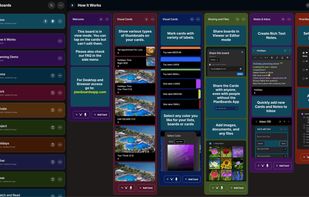
PlanBoards: ToDo & Notes is a visual Task Manager with powerful Kanban boards, in a fully customizable, color-coded workspace. It has rich text Notes integrated with cards, sharable boards (in Editor and Viewer mode), and cards that can be shared with people without the app.
Cost / License
- Subscription
- Proprietary
Platforms
- iPhone
- Android
- Online
- Software as a Service (SaaS)
PlanBoards: ToDo @ Notes News & Activities
Highlights All activities
Recent activities
- dominikanderson5 added PlanBoards: ToDo @ Notes
- dominikanderson5 added PlanBoards: ToDo @ Notes as alternative to Trello, Taiga.io, Asana and JIRA
PlanBoards: ToDo @ Notes information
No comments or reviews, maybe you want to be first?
What is PlanBoards: ToDo @ Notes?
The App is very fast, stable and has multiple useful features. Here are the core unique features:
- Board Sharing in Editor & Viewer Mode. (not found in any other existig App)
- Share boards with teammates, family, or friends - with editor or viewer permissions.
- Rich Text Notes within individual tasks. (not found in any other existing App)
- Write detailed, formatted notes inside each card using a built-in rich text editor.
- Share Cards/Tasks Without Requiring an Account (not found in any other existing App)
- Share full cards (with notes, files, and checklists) to anyone - even if they don’t use the app. No signup required.
- Attach Images & Files with multiple thumbnails sizes on cards (not found in any other existing App)
- Upload images and view them in many thumbnail shapes depending on your needs.
- Full Workspace Customization
- Change the color of lists, board backgrounds, top bars, cards and your home screen boards. Make your workspace truly yours.
- Colorful Labels
- Highlight categories or urgency with a variety of customizable labels on each card.
- Quick Add from Home Screen
- Instantly add new cards or notes with one tap, right from your home screen.
- Jump to Last Edited Card
- With a single tap, instantly open the card you last worked on inside any board - no scrolling needed.
- Quick Card Move
- Move cards to different lists or even other boards in just two taps - fast, simple, and effortless.
- Visual, fast Interface
- Enjoy a clean, visual design that’s optimized for speed and focus - perfect for daily productivity.
- AI Assistance - Creating tasks with due dates, priorities and checklists by using voice recording processed by AI.
- Flexible Cards with Rich Content
- Each card supports notes, checklists, due dates, attachments, labels, and more - so every task stays organized.
- Checklists Inside Cards
- Break tasks into smaller steps with flexible checklists and track your progress visually.
- Due Dates & Priorities
- Add deadlines and prioritize tasks to stay focused on what matters most. 15 Move or Duplicate Cards
- Instantly duplicate or move cards between lists and boards for flexible task management.
- Instant Search
- Search for any card across a board or your entire account with lightning speed.
- Light & Dark Mode
- Switch between light and dark themes for comfort and style - anytime.
- Cloud Sync with Firestore
- All your data is backed up and synced in real time across your devices.
- Secure & Private
- Your boards and data are encrypted and safely stored in the cloud.
- Offline Access
- Work seamlessly without an internet connection - your changes sync automatically once you're back online.
- Unlimited Kanban Boards
- Create separate boards for personal tasks, work projects, school planning, or team collaboration — with no limits.
- Lists with Drag-and-Drop Control
- Move lists left or right, arrange them your way, and build a visual workflow that fits your brain.



