


Pika Backup
10 likes
Pika Backup is designed to save your personal data and does not support complete system recovery. Pika Backup is powered by the well-tested BorgBackup software.

Cost / License
- Free
- Open Source (GPL-3.0)
Application type
 EU
EUPlatforms
- Linux
- Linux Mobile
- Flathub
- GNOME
- Flatpak


Features
Highlights All activities
Pika Backup News & Activities
Recent News
No news, maybe you know any news worth sharing?
Share a News Tip
Recent activities
- Kaiyan liked Pika Backup
- TBayAreaPat commented on Pika Backup
Vorta is a sort of Windows version. It's noted that files are put into Borg Backup format for both Pika and Vorta.
- monfsa liked Pika Backup
- probstda liked Pika Backup
 rapha added Pika Backup as alternative to Arco Backup


What's on my 2024 Linux Laptop
A list with 53 apps by amenthes without a description.



Linux MUSTS (Almost All Nice & Modern UI/UX)
A simple list of Applications I use daily, hopefully you haven't seen all of these before. But, in this list you'll generally find apps that look modern, as UI is pretty important to me. I know there aren't too many "Linux with Pretty UI" lists, so here's this one. Let me know if there are any you'd add!



The (few) software I currently use on my Linux laptop
Here are all the software I use on my Linux laptop. For the rest, I just use the default apps shipped with KDE Plasma (Okular, Gwenview, Konsole, Dolphin, Spectacle, KDEConnect, etc.).
If you have any remark or question, please leave a comment below.
Official Links
Install from the command line
flatpak install flathub org.gnome.World.PikaBackup
Developed by
 sophie-h
 Licensing
Open Source (GPL-3.0) and Free product.Written in
Rating
Average rating of 4.7Alternatives
10 alternatives listedBadge
Get an embeddable badge for Pika BackupSupported Languages


Comments and Reviews
Linux's native TimeShift utility is great, but it backs up the OS, not user data. While rsync backups duplicate the file tree, I wanted something that generated a small file set incremental archive of user files.
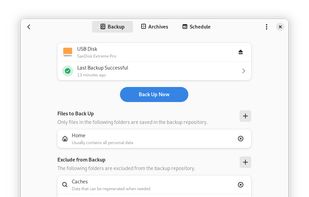
Pika does that quite well. It's easy to set up, and once configured, there's literally a "Back Up Now" button that does all the work. It handles the incremental backup, and like TimeShift, it can keep a history of archives. It can be run manually, or be scheduled to run automatically.
Where TimeShift backs up operating system files but not user files, Pika does the opposite. Using the two gives full coverage. You can encrypt the backups, and configure pre- and post-backup scripts to run, if you want, although I don't bother with either.
It's a one-click backup solution that's easy, reliable, and can be made secure, as well.
Vorta is a sort of Windows version. It's noted that files are put into Borg Backup format for both Pika and Vorta.
fr/en
une pure merveille
-- a pure wonder
I love Timeshift, but since it's not 100% compatible with Fedora, I was looking for something else, and found this software based on
  BorgBackup, and it's really great. It's simple, fast and the GUI is intuitive. Really good piece of sofware!