Picrota Lite icon
Picrota Lite icon

Picrota Lite

Picrota Lite is a lightweight image editor for quick desktop workflows. Open an image in Chrome or Edge, mask sensitive information, rotate or flip it, zoom into details, autofit it to the screen and save the edited image as a PNG.
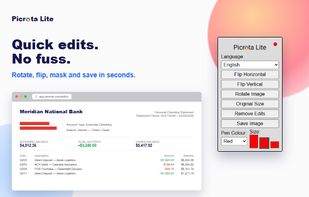
Picrota Lite for quick rotate, flip, mask and save workflows.

Cost / License

  • Free
  • Proprietary

Application type

Platforms

  • Microsoft Edge
  • Google Chrome
1like
1comment
0articles

Features

Properties

  1.  Privacy focused
  2.  Lightweight

Features

  1.  No registration required

Picrota Lite News & Activities

Highlights All activities

Recent activities

Picrota Lite information

  • Developed by

    MT flagPicrota
  • Licensing

    Proprietary and Free product.
  • Alternatives

    3 alternatives listed
  • Supported Languages

    • English
    • Chinese
    • Spanish
    • Arabic
    • Persian
    • Portuguese
    • French
    • German
    • Polish
    • Japanese
    • Italian
    • Dutch
    • Russian
    • Hebrew
    • Turkish
    • Vietnamese
    • Korean
    • Swahili
    • Ukrainian
    • Romanian
    • Greek
    • Hungarian
    • Swedish
    • Czech
    • Danish
    • Norwegian Bokmål
    • Catalan; Valencian
    • Croatian
    • Finnish
    • Latvian
    • Lithuanian
    • Bulgarian
    • Serbian

AlternativeTo Categories

Web BrowsersPhotos & Graphics

Our users have written 1 comments and reviews about Picrota Lite, and it has gotten 1 likes

Picrota Lite was added to AlternativeTo by mmsaydon on and this page was last updated .

Comments and Reviews

   
mmsaydon
1

its simple to use

Review from a new or low-activity account — shown here, but not counted in the app rating.

What is Picrota Lite?

Picrota Lite is a lightweight image editor for quick desktop workflows. Open an image in Chrome or Edge, mask sensitive information, rotate or flip it, zoom into details, autofit it to the screen and save the edited image as a PNG.

It is useful for office work, document review, support and administrative tasks where opening a full image editor would add unnecessary steps.

Images stay on your device and are not uploaded to Picrota for editing. Limited privacy-conscious product analytics are used to understand feature usage and technical errors.

Picrota Lite Videos