Picantex is a Chrome extension for taking screenshots of web pages and annotating them. It captures the visible area, a selection, a single page element or the full page, also after a short delay and also in pages that scroll inside an inner panel, and opens the result in a built-in editor.
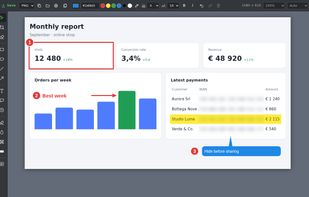
The editor offers rectangles, ellipses, lines, arrows, freehand drawing, speech bubbles, numbered steps with sub-steps and text, a highlighter, and three ways to hide sensitive data: blur, pixelation and a solid cover. Parts of the image can be erased, cropped and zoomed, and marks can be copied from one capture to another.
Because the capture is taken from the page itself, Picantex keeps the page's real text. Any area of a screenshot can be copied as text without OCR, and the PDFs it saves are searchable, with the text laid invisibly over the image. Text that was covered, blurred or erased is left out of the PDF, so it cannot be recovered by copying. Several captures, or images already on the computer, can be gathered into a multi-page document and saved as one PDF or printed.
Picantex also opens existing PDFs, from the computer or from a browser tab, so that selected pages can be annotated or added to the document together with their text.
All processing happens on the computer. Nothing is uploaded, and there is no account, no advertising and no analytics. The only third-party component is Mozilla's PDF.js, which runs in an isolated page without network access. The extension has no standing access to websites: it reads a page only when its icon or right-click menu is used.
The interface is available in English, Italian and Spanish. Picantex is installed from the Chrome Web Store and also works in Microsoft Edge, Brave, Opera and Vivaldi.






 EU
EU


 Radu GT added Picantex as alternative to GoFullPage, Lightshot, FireShot, Awesome Screenshot and 6 more
 DigitalBanzai


No comments or reviews, maybe you want to be first?