


Pi-hole
201 likes
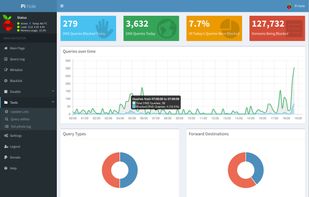
Blocks ads for all connected devices at the DNS layer without client setup. Provides web control, in-app ad and tracker blocking, DHCP and API support, regex filtering, privacy modes, audit logs, and long-term query analytics for network management.

Cost / License
- Free
- Open Source
Application typeApplication types
Platforms
- Linux
- Self-Hosted
- CentOS
- Fedora
- Ubuntu
- Debian
- Raspberry Pi OS
- Raspberry Pi


Features
Pi-hole News & Activities
Highlights All activities
Recent News
- Mauricio B. Holguin published news article about Pi-hole
- Paul published news article about Pi-hole
- Paul published news article about Pi-hole


Recent activities


Featured in Lists



Into the Cyberverse
The ultimate list of apps/services for better Security, Privacy & Anonymity; Defense against Surveillance.
What sets this list apart is its commitment to authenticity:
No Sponsorship: Choices are made without commercial bias.
No Affiliate Links: Purely user-benefit-focused.
No Brand Deals: Independent and unbiased evaluations.
Strict criteria ensure the tools prioritize user welfare and software quality:
Opensource Preference: Prioritizing transparent and community-driven software.
Cross-Platform Availability: Emphasizing tools usable across multiple systems.
Active Development and Security Updates: Selecting only actively maintained tools with regular security enhancements.
Proven Track Record: Requiring a history of reliability and positive feedback.



Selfhosting
Selfhosting is where you're hosting your own websites, apps, software, tools, and much more on your own server instead of having to rely on 3rd-party cloud providers such as Hetzner. Taking this approach to hosting gives you more control over your data and how your server or servers are managed.
When you are running multiple things on one or two servers, within your home, it's called a "Homelab" and you're "Homelabbing" at that point.
Running your own server and homelab within your home is great for privacy-conscious individuals such as myself, tech enthusiasts, small businesses, and those seeking more control of their digital life.
The following lists provided here are applications and software I've gotten comfortable with and enjoyed using over the past 3 and a half years since I started homelabbing, it's based on my experience and what fits my criteria. Some well known softwares won't be listed here, as my experience may of not been at best with them.
My criteria is that software is built in the open, respects user privacy and security, should not require a license to operate, and don't contain profanity and other minor things.
I'm also willing to test new software to selfhost, feel free to comment or message me to try out other alternatives.
There are other places to check out as well for those interesting selfhosting, such as Awesome Selfhosted, selfh.st, and other places you can find on the internet.
https://github.com/awesome-selfhosted/awesome-selfhosted
https://github.com/awesome-foss/awesome-sysadmin
https://github.com/veggiemonk/awesome-docker
If you ever need help with selfhosting, you can check out the following communities:
Homelab Community on Fluxer, I personally run
/r/selfhosted (Reddit)
/c/selfhosted (Lemmy / Fediverse)
There's also a wiki you can look into as well.
If you believe an alternative software should be added to this list, please contact me or direct message via my AlternativeTo account. I'm also available on Signal.
This lists gets updated every month at least, check back regularly.


My privacy & user friendly setup [2026]
What I use to protect my privacy that I would actually recommand to everyone to try as it does not requiere a lot of effort to use that instead of the GAFAM and Big Brother stuff !
Updated for 2026
What is Pi-hole?
Pi-hole information
Developed by
 Pi-hole, LLC
 Licensing
Open Source and Free product.Rating
Average rating of 4.8Alternatives
45 alternatives listedNews
5 news article related to Pi-holeBadge
Get an embeddable badge for Pi-holeSupported Languages
AlternativeTo Categories
Network & Admin, Security & Privacy, Web Browsers, DevelopmentGitHub repository
- 61,134 Stars
- 3,320 Forks
- 45 Open Issues
- Updated


Comments and Reviews
Great open-source software. You can use it not only for ads, but also for DNS, including setting it up with DNSCrypt anonymized relays.
So basically you don't even need a browser ad-blocker, or to set up a separate DNS service.
And you also don't need to set it up on a separate server or docker if you don't want. You can set it up directly on Windows (basically) with WSL: https://github.com/DesktopECHO/Pi-Hole-for-WSL1
No doubt the best ad blocking dns ever made
good open source add to block ads on your network. works well on a raspberry pi. easy to install
One of the best projects I have ever followed. It works great at home and office.
This is the first piece of software I installed on my DietPi system. it is amazing on my Nvidia Shield Android TV. I have blocked ads for A&E, Tubi TV, Pandora, Haystack news, Redbox
Unsupported OS detected: Linuxmint 20.3
Best way to block ads/telemetry from any app that isn't a web browser, and for web browsers is an excellent complement to uBlock Origin.
Why don't you think it's not good for web browsers? It does sometimes leave an empty grey box that says "advertisement," but that's a tradeoff for less browser fingerprinting.