PeekCSS icon
PeekCSS icon

PeekCSS

Quickly inspect grouped CSS details by hovering over elements, extract full color palettes with usage, analyze fonts and styles, browse and bulk download site images, automate contrast checks, and export palettes or font data in various formats with no sign-up required.
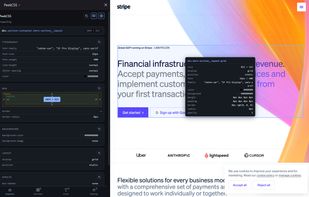
PeekCSS screenshot 1

Cost / License

  • Freemium (Pay once or Subscription)
  • Open Source

Platforms

  • Google Chrome
  • Mozilla Firefox
0likes
0comments
0articles

Features

PeekCSS News & Activities

Highlights All activities

Recent activities

PeekCSS information

  • Developed by

    CH flagLeon Grass
  • Licensing

    Open Source and Freemium product.
  • Pricing

    One time purchase that costs up to $59, and / or subscription ranging between $2 and $5 per month + free version with limited functionality.
  • Written in

  • Alternatives

    4 alternatives listed
  • Supported Languages

    • English

AlternativeTo Categories

DevelopmentWeb Browsers

GitHub repository

  •  1 Stars
  •  0 Forks
  •  0 Open Issues
  •   Updated  
View on GitHub
PeekCSS was added to AlternativeTo by Peeky on and this page was last updated . PeekCSS is sometimes referred to as Peek CSS
No comments or reviews, maybe you want to be first?

What is PeekCSS?

PeekCSS is a fast, actively maintained CSS inspection extension for developers and designers — built as a modern alternative to CSS Peeper, which has seen no updates in years.

Hover over any element on a page to see its CSS instantly, or click it to load the full computed style into a sidebar panel, neatly grouped into Typography, Colors, Spacing, Effects, and Layout. Contrast ratios are calculated automatically with AA/AAA pass-fail badges right in the color panel, and any property, group, or full style block can be copied to the clipboard in one click.

Beyond single-element inspection, PeekCSS scans the whole page: pull a deduplicated color palette (up to 120 colors) with usage breakdowns by text/background/border, browse every image on the page with one-click downloads (or grab them all at once as a ZIP), and get a full typography report — every font family in use, weights, sizes, and role classification (Headings/Body/UI/Other). Pro users also get instant font-pairing suggestions sourced from Google Fonts' public catalog, and can export color palettes directly as CSS custom properties, SCSS variables, JSON, or a Tailwind config.

Core inspection works with no account required. A free account unlocks the page-wide Overview and Typography tabs; Pro adds palette export, ZIP downloads, and font pairing. Available now for Firefox and Chrome (and compatible with Chromium browsers like Edge, Brave, and Vivaldi).

Core features:

Hover-to-inspect CSS with contrast ratio checks One-click copy for any property, group, or full style Page-wide color palette extraction with export (CSS/SCSS/JSON/Tailwind) Image gallery with single or bulk ZIP download Full-page typography audit with font pairing suggestions No account needed for core inspection tools
