





Stylepick
Like
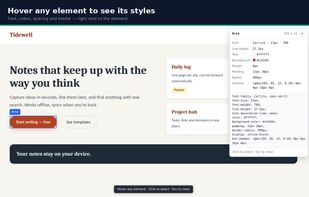
Stylepick shows the CSS of whatever you hover over on a page - font, size and weight, line height, text and background color, margin, padding, border, corner radius and shadow - and copies it as a short, readable block instead of a full computed dump.

Cost / License
- Freemium (Pay once or Subscription)
- Proprietary
Since
- New


Features
Highlights All activities
Stylepick News & Activities
Recent activities
- Paul updated Stylepick
- infora added Stylepick
- Paul updated Stylepick
- infora updated Stylepick
- infora updated Stylepick
 infora added Stylepick as alternative to CSS Peeper, PeekCSS, SnipCSS, CSS Scan Pro and 2 more

Developed by
inforaLicensing
Proprietary and Freemium product.Pricing
One time purchase that costs $24, and / or subscription that costs $3 per month + free version with limited functionality.Alternatives
6 alternatives listedBadge
Get an embeddable badge for StylepickSupported Languages


No comments or reviews, maybe you want to be first?