
Code Specimen icon
Code Specimen icon

Code Specimen

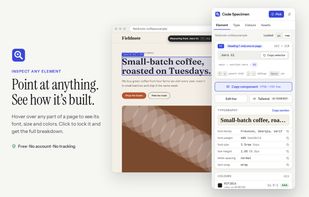
Free Chrome and Firefox extension for inspecting web pages through a side panel. View fonts, colors, spacing, box-model values and CSS, copy components, export palettes, download assets, edit styles live, and convert selections to Tailwind classes.
Code Specimen CSS Inspector

Cost / License

  • Free
  • Proprietary

Platforms

  • Online
  • Chrome OS
  • Mozilla Firefox
1like
0articles
Save

Features

Properties

  1.  Privacy focused
  2.  Lightweight
  3.  AI-Powered

Features

  1.  Website Translation
  2.  Ad-free
  3.  Dark Mode
  4.  No registration required
  5.  Import CSV Data
  6.  No Tracking
  7.  No Logs
  8.  Color Palette
  9.  Export to HTML
  10.  Browser extension

Code Specimen News & Activities

Highlights All activities

Recent activities

Code Specimen information

Code Specimen was added to AlternativeTo by fredrick on and this page was last updated .

No comments or reviews, maybe you want to be first?

Official Links

What is Code Specimen?

Code Specimen is a free CSS Inspector browser extension for Chrome and Firefox. It analyzes web page elements, highlighting their tags and sizes when hovered over. Clicking an element opens a side panel displaying its font, colors, spacing, and CSS, with copy buttons for each value.

The panel has four tabs: Element, Type, Colours, and Assets. The Element tab details a single element and its box model, with a px/rem switch. The Type tab lists all text styles on the page. The Colours tab shows the palette, divided into text, background, and border categories, with contrast ratios and export options. The Assets tab compiles all images and CSS backgrounds into a grid, with a download option.

Code Specimen also allows copying of a whole component as HTML and CSS, including hover and focus styles and media queries. It enables real-time value editing, hover and focus state viewing, color usage highlighting, element navigation with arrow keys, and color selection from photos. Tailwind users can convert components into Tailwind classes.

No account is needed to use Code Specimen, and it has no usage limit. It doesn't use analytics or ads, and only operates when activated. It never reloads the page and requires only four permissions. The extension is accessed using Alt+Shift+S, or Cmd+Shift+S on a Mac.