
Smart Design Inspector icon

Smart Design Inspector

 Like

Smart Design Inspector puts in one Chrome side panel what usually takes several extensions: design inspection, SEO checks, full-page capture and a side-by-side comparison of competitor websites.
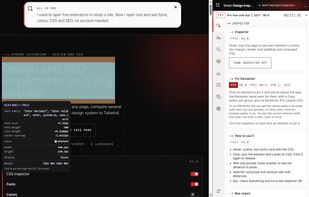
Element inspector: computed CSS, box model and measurements

Cost / License

  • Freemium (Pay once)
  • Proprietary

Since

  • New

Platforms

  • Google Chrome
  • Microsoft Edge
0likes
0articles
Save

Features

Features

Highlights All activities

Smart Design Inspector News & Activities

Recent activities

Smart Design Inspector information

  • Developed by

    ES flagSMARTbrain Activity
  • Licensing

    Proprietary and Freemium product.
  • Pricing

    One time purchase (perpetual license) that costs $55 + free version with limited functionality.
  • Alternatives

    8 alternatives listed
  • Badge

    Get an embeddable badge for Smart Design Inspector
  • Supported Languages

    • English
    • Spanish
    • Catalan; Valencian
    • French
    • German
    • Italian
    • Portuguese
    • Chinese

AlternativeTo Category

Development
Smart Design Inspector was added to AlternativeTo by SMARTbrainActivity on and this page was last updated .

No comments or reviews, maybe you want to be first?

What is Smart Design Inspector?

Smart Design Inspector puts in one Chrome side panel what usually takes several extensions: design inspection, SEO checks, full-page capture and a side-by-side comparison of competitor websites.

Design: hover to inspect computed CSS, box model, margins and padding; measure distances; list fonts with weights, sizes, source and license; type scale; color palette, gradients, eyedropper, color converter (HEX, RGB, HSL, OKLCH) and WCAG contrast.

SEO and performance: title, description, canonical, robots and meta tags with length checks; Google and social previews (Open Graph, X, LinkedIn, WhatsApp); H1-H6 headings; image alt, weight and format; links; structured data; Core Web Vitals.

Capture and code: full-page screenshots and extraction of a section's HTML and CSS, including export for Elementor.

The free version needs no account or login, and analyses stay in the browser. Pro is a one-time payment that adds unlimited comparisons, design system export and more code export options.