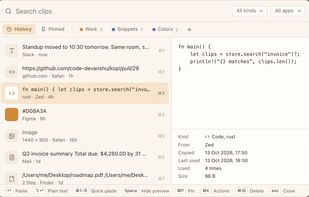
Your clipboard, but a grid. Hit a keyboard shortcut, see everything you've ever copied, file the keepers into categories, paste with a click.
Cost / License
- Free
- Proprietary
Platforms
- Mac


Paste is described as 'Stores everything you copy on your Mac, iPhone, and iPad, so it's always there whenever you need it again' and is a clipboard manager in the office & productivity category. There are more than 100 alternatives to Paste for a variety of platforms, including Mac, iPhone, iPad, Windows and Linux apps. The best Paste alternative is UniClipboard, which is both free and Open Source. Other great apps like Paste are Alfred, PasteBar, Planck and Vorssaint.
Your clipboard, but a grid. Hit a keyboard shortcut, see everything you've ever copied, file the keepers into categories, paste with a click.


CleanBoard is a lightweight clipboard utility for macOS that removes unwanted formatting from copied text—so you can paste clean, plain text into any app with ease.

Terminal-native clipboard vault for developers — auto-classifies, encrypts secrets, and recovers context fast.


Minimal, native clipboard manager for macOS — one-time purchase, cross-type history (text, code, images, files), and instant search.


Copy text with Command + C and append it to the last copied text instead of replacing it! Activate inserting with a custom shortcut.


A fast, easy-to-use and customizable clipboard manager. Be more productive by using keyboard shortcuts and the integrated search to move through your history.


Text Catalyst is a clipboard manager and text expander in one native Mac app. Everything you copy is saved and searchable. Everything you type often becomes a snippet that expands anywhere — all without your hands leaving the keyboard.


A lightweight, native macOS clipboard manager that lives in your menu bar, fits the platform aesthetic, and gets out of the way.

A native macOS clipboard manager that turns everything you copy into a searchable, visual timeline — including your screenshots.


Mac clipboard history manager inspired by Windows, holding text, images, files, folders, and groups. Customize up to 50 items. Access via shortcuts and command keys. Opens at the bottom right, with a status menu bar icon. Provides comprehensive usage tips.