

Pano for Mac icon
Pano for Mac icon

Pano for Mac

 Like

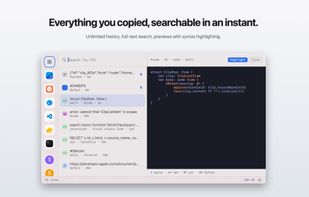
Stores unlimited clipboard history locally in SQLite, with full-text search by app, type, age and pins. It previews code and colours, extracts screenshot text using on-device OCR, runs JSON, Base64 and Markdown transforms, and detects or masks sensitive copied data.
Pano for Mac screenshot 1

Cost / License

  • Free
  • Proprietary

Application type

Since

  • New

Platforms

  • Mac
0likes
0articles
Save

Features

Properties

Features

Highlights All activities

Pano for Mac News & Activities

Recent activities

Pano for Mac information

AlternativeTo Category

Development

Popular alternatives

View all
Pano for Mac was added to AlternativeTo by Mauricio B. Holguin on and this page was last updated . Pano for Mac is sometimes referred to as Pano, Pano: Clipboard Manager. 

No comments or reviews, maybe you want to be first?

Official Links

What is Pano for Mac?

Pano is a native clipboard manager for macOS that keeps a searchable history of everything you copy and brings any earlier clip back from a keyboard-driven panel. It is built for people who copy code and data all day: the history is unlimited, backed by full-text search, and can be filtered by content type, source app, age or pinned status.

Typing a transform name in the search field converts the clip in the preview, so JSON can be pretty-printed, Base64 decoded, JWT claims read, text turned into a slug or cleaned up, and Markdown copied as rich text. Copied colours are shown with their RGB, HSL, SwiftUI and nearest Tailwind equivalents, code is previewed with syntax highlighting, and the text in copied screenshots is read with on-device OCR so it can be searched. Pins and pinboards keep the snippets you reuse from expiring.

The history lives in a single local SQLite database. The app is sandboxed and ships without network access, so there is no sync, account or telemetry. API keys, tokens, card numbers and IBANs are detected on capture, can be masked and expire sooner, anything a password manager marks as concealed is never saved, and specific apps can be excluded from capture.