
Pangalin Uninstaller icon

Pangalin Uninstaller

 Like

Dragging an app to the Trash leaves its support files, caches, preferences, helpers and plug-ins behind. Pangalin Uninstaller lists every one, with its size and location, before anything moves. Untick what you want to keep; everything else goes to the Trash, and Undo puts back...
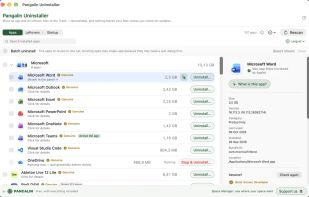
Apps: every installed app with its size, last use and a Genuine? tick

Cost / License

  • Free
  • Proprietary

Application type

Since

  • New

Platforms

  • Mac
0likes
0articles
Save

Features

Properties

Features

Highlights All activities

Pangalin Uninstaller News & Activities

Recent activities

Pangalin Uninstaller information

AlternativeTo Category

OS & Utilities
Pangalin Uninstaller was added to AlternativeTo by pangalin on and this page was last updated .

No comments or reviews, maybe you want to be first?

What is Pangalin Uninstaller?

Dragging an app to the Trash leaves its support files, caches, preferences, helpers and plug-ins behind. Pangalin Uninstaller lists every one, with its size and location, before anything moves. Untick what you want to keep; everything else goes to the Trash, and Undo puts back your last removal. Recently removed puts back anything removed in the last 7 days, even after you quit, while it's still in the Trash. (Pangalin is sometimes typed "Pangolin", like the animal.)

Every app gets a Genuine? tick, checked on your Mac: gold when it's signed by its known developer, red for a possible fake. Removing an app also resets its privacy permissions, and lists background items, installer and Homebrew files, and AI model folders it left elsewhere.

It also covers the Mac-wide /Library (audio plug-ins, daemons, helpers), hidden folders in your home folder (such as ~/.vscode), App Store and installer apps (with your approval), leftovers of apps you deleted long ago, resetting an app, and what starts with your Mac. Apps installed with Homebrew can be removed with Homebrew itself. On macOS 26, Apple Intelligence can explain a file in plain English, on your Mac.

Every leftover in the review says whose it is: This app's, Probably this app's, or Might be another app's. Crypto wallets are always kept: wallet data and browser profiles with a wallet extension are never removed. You can start from Finder's right-click menu, or by dropping an app on the Dock icon or the window. In English, German, French and Spanish.

Completely free, with every feature included: no account, no ads, no data collection. Notarised by Apple. Requires a Mac with Apple silicon and macOS 13 Ventura or later. Made by two brothers in South Africa.