
Padrail icon
Padrail icon

Padrail

 Like

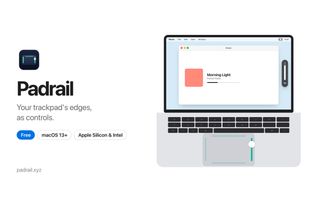
A free macOS menu bar utility that turns MacBook trackpad edges into sliders for volume, display brightness and keyboard backlight. The top edge adapts to the front app to switch tabs, zoom, skip tracks or change desktops, and edges are ignored while typing or holding a click.
Padrail screenshot 1

Cost / License

  • Free
  • Proprietary

Since

  • New

Platforms

  • Mac  Requires macOS 13 or later. Magic Trackpad support is in beta.
0likes
0articles
Save

Features

Properties

Features

Highlights All activities

Padrail News & Activities

Recent activities

Padrail information

AlternativeTo Category

OS & Utilities
Padrail was added to AlternativeTo by iyia_ on and this page was last updated .

No comments or reviews, maybe you want to be first?

Official Links

What is Padrail?

Padrail is a free Mac menu bar app that turns the edges of your MacBook trackpad into controls. Slide one finger along the right edge to change the volume, along the left edge for brightness (external monitors included) and along the bottom edge for the keyboard light. The top edge adapts to the app in front: it switches tabs in Safari, Chrome and Arc, zooms in Figma and Preview, skips tracks in Spotify and Music, and switches desktops everywhere else.

A slide only counts when one finger lands on an edge and moves along it, so normal scrolling and clicks keep working. The edges also ignore you while you type or hold a click, and you can pause Padrail in specific apps like games. Optional haptic ticks at 0%, 100% and your favorite volume, a volume cap for headphones, and a live preview of your finger in Settings to tune how wide the edges are.

No account, no license key. Signed and notarized by Apple, macOS 13 or later, Apple Silicon and Intel.

Padrail Videos