
Oxide icon
Oxide icon

Oxide

 Like

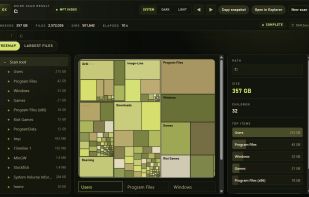
Oxide shows what is taking up space on a Windows drive. It reads the NTFS index directly and presents the results as an interactive treemap and a list of the largest files. You can drill into folders and reveal an item in Explorer.
Oxide screenshot 1

Cost / License

  • Pay once
  • Proprietary

Since

  • New

Platforms

  • Windows
0likes
0articles
Save

Features

No features, maybe you want to suggest one?

Highlights All activities

Oxide News & Activities

Recent activities

Oxide information

  • Developed by

    Keethesh Mootoosamy
  • Licensing

    Proprietary and Commercial product.
  • Pricing

    One time purchase (perpetual license) that costs $9.
  • Alternatives

    4 alternatives listed
  • Badge

    Get an embeddable badge for Oxide
  • Supported Languages

    • English

AlternativeTo Category

System & Hardware
Oxide was added to AlternativeTo by Keethesh-Mootoosamy on and this page was last updated .

No comments or reviews, maybe you want to be first?

What is Oxide?

Oxide shows what is taking up space on a Windows drive. It reads the NTFS index directly and presents the results as an interactive treemap and a list of the largest files. You can drill into folders and reveal an item in Explorer.

The app is read-only: it does not delete files or look for duplicates. It is designed for drives with large numbers of files.

The current release costs $9 as a one-time purchase, with no subscription or account required. It runs on Windows 10 and 11 (64-bit) and requires WebView2. The executable is unsigned, so Windows SmartScreen may display a warning.