Track the time you mean to spend.
Most time trackers answer "where did my hours go?" OwnTime answers a better question: which of the things you care about are you neglecting right now?
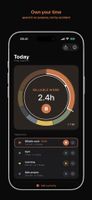
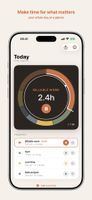
You define a small set of priorities — the parts of your life that actually matter — and give each one a daily budget. Then you start and stop sessions as the day unfolds. At a glance you see what still has time left and what you've been ignoring.
IPHONE AND APPLE WATCH
OwnTime works on its own on iPhone — start, stop, and log sessions, get budget alarms, and follow the live session on the Lock Screen and Home Screen. Add an Apple Watch and it becomes a first-class second surface, built for the next two seconds of intent: start, stop, glance. Your priorities and sessions sync directly between your own devices, and neither one needs the other nearby.
BUDGETS, NOT TIMESHEETS
Each priority has a daily budget, so neglect is visible at a glance — no spreadsheets, no billing, no projects. Optional alarms warn you before a budget runs out.
YOUR DATA, IN A FILE YOU OWN
One tap exports your complete history as a standard SQLite database — the same file the app itself uses. Open it with any tool you like, or keep it as a backup. No export format to decode, no account to request it from.
PRIVATE BY DESIGN
OwnTime has no server and no account. Your priorities and sessions live on your iPhone and Apple Watch and sync directly between your own paired devices over Apple's WatchConnectivity — never through us, never to the cloud. No analytics, ever.
ALSO INCLUDED
• Home Screen widgets (small and medium) with your remaining budget at a glance
• Live Activity on the Lock Screen and Dynamic Island
• Start, stop, and log past sessions with Siri and Shortcuts
• Quick edits on iPhone or Apple Watch — name, daily budget, colour
• Light and dark appearance
OwnTime is for personal attention, not invoicing. If you want to see whether you're actually living by your priorities — not just logging hours — this is the tracker for you.










 Paul added OwnTime as alternative to Tymerao, Toggl Track, ManicTime, RescueTime and 18 more


No comments or reviews, maybe you want to be first?