
Osenpa Disk Analyzer icon

Osenpa Disk Analyzer

Free disk analyzer for Windows scans drives to reveal largest files and folders, displays visual tree with size bars, supports file type labels and minimum-size filtering, offers search and browser-based lookup, and includes safe cleanup features to remove temporary files.
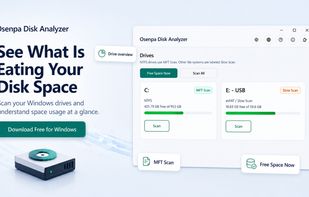
Osenpa Disk Analyzer for Windows helps you see what is eating your disk space with drive overview, MFT Scan, and Free Space Now cleanup.

Cost / License

  • Free
  • Proprietary

Platforms

  • Windows
0likes
0comments
0articles

Features

Properties

  1.  Support for Themes

Features

  1.  Ad-free
  2.  Portable
  3.  Dark Mode
  4.  No registration required
  5.  Works Offline
  6.  Delete Temporary Files

Osenpa Disk Analyzer News & Activities

Highlights All activities

Recent activities

Osenpa Disk Analyzer information

  • Developed by

    Osenpa
  • Licensing

    Proprietary and Free product.
  • Alternatives

    5 alternatives listed
  • Supported Languages

    • English
    • Turkish
    • German
    • Spanish
    • French
    • Portuguese
    • Russian
    • Chinese
    • Arabic
    • Hindi
    • Bengali
    • Urdu
    • Indonesian
    • Marathi
    • Telugu
Osenpa Disk Analyzer was added to AlternativeTo by osenpa on and this page was last updated .
No comments or reviews, maybe you want to be first?

What is Osenpa Disk Analyzer?

Osenpa Disk Analyzer is a free Windows disk space analyzer for finding out what is taking up storage on your PC.

The app can scan all drives or a single drive, then display the largest folders and files in a clean visual tree with size bars, file type labels, expandable folders, search, and minimum-size filtering.

It also includes a browser-based online lookup action, allowing users to search information about unfamiliar files or folders before deciding what to delete.

For quick cleanup, Free Space Now can remove temporary files, cache locations, and Recycle Bin contents while keeping personal folders and Downloads out of automatic cleanup. Protected system locations are guarded to reduce accidental deletion risks.

Osenpa Disk Analyzer runs locally on Windows and does not read file contents. It is designed for users who want a simple, privacy-conscious way to analyze disk usage, find large files, and free up space.

Official Links