
OpenCapture (Browser Extension) icon

OpenCapture (Browser Extension)

📸 Free, open-source full-page screenshot & scrolling capture browser extension. 100% local, privacy-first GoFullPage alternative. Export to PNG & PDF.
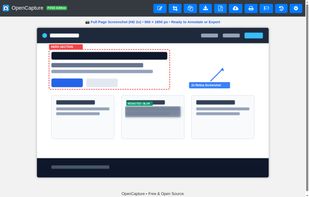
OpenCapture (Browser Extension) screenshot 1

Cost / License

  • Free
  • Open Source (MIT)

Application type

Platforms

  • Google Chrome
  • Microsoft Edge
  • Brave
  • Opera
  • Vivaldi
  • Chromium
0likes
0articles

Features

  1.  Annotate Screenshot
  2.  Full-page Screenshot
  3.  No Tracking
  4.  No registration required
  5.  Image and PDF export
  6.  Browser extension

OpenCapture (Browser Extension) News & Activities

Highlights All activities

Recent activities

OpenCapture (Browser Extension) information

AlternativeTo Categories

Photos & Graphics, Web Browsers

GitHub repository

  •  5 Stars
  •  0 Forks
  •  0 Open Issues
  •   Updated  
View on GitHub
OpenCapture (Browser Extension) was added to AlternativeTo by Cloudless-Louren-o on and this page was last updated .
No comments or reviews, maybe you want to be first?

Official Links

What is OpenCapture (Browser Extension)?

OpenCapture is a lightweight, local-first browser extension for full-page screenshots, scrollable container captures, and image annotations—without subscriptions, artificial paywalls, or telemetry.

Designed as a transparent, open-source alternative to tools like GoFullPage, Awesome Screenshot, and Nimbus, OpenCapture processes everything client-side inside the browser sandbox:

  • Full-Page & Container Stitching: Automatically scrolls and stitches full web pages as well as nested, scrollable <div> containers.
  • High-DPI / 2x Rendering: Native Retina support to keep text and vector assets sharp on high-resolution displays.
  • Smart Page Splitting: Slices ultra-long captures into separate, manageable segments to prevent browser canvas memory crashes.
  • Built-in Redaction & Markup: Annotate with arrows, shapes, and freehand tools, or sanitize credentials using pixelate/blur filters before saving.
  • Multi-Format Export: Export locally to PNG, JPEG, or multi-page PDF documents without watermarks.
  • Zero Telemetry & Local-First: No accounts, no cloud dependencies, and zero background analytics. Your captured data never leaves your machine.