ONE-TAP THEMES
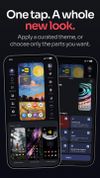
• Apply a curated theme and your layout, icons, widgets, materials, folders, app drawer, wallpaper and Today page change together, or pick only the parts you want.
• Save your own themes and switch between them whenever you like.
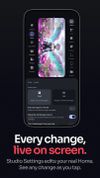
• Design everything in Studio, the visual editor built into the launcher.
THREE WAYS TO LAY OUT HOME
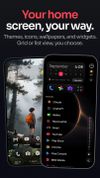
• Grid: icons and widgets on pages, with grids up to 12 columns and 18 rows and free half-cell placement.
• List: your apps as a clean list with an A–Z rail, instead of an icon grid.
• Rooms: a few rooms that fill themselves with the apps you use most, one swipe apart, each with its own widget, and All apps at the end.
• Separate layouts for the cover and inner screens of foldables, a landscape layout for any screen, and tablet support.
• Dock styles with up to three rows, with widgets and large folders in the dock.
• Folders that open full page, wear an app icon, a pack icon or your own picture, and sort A–Z.
ICON PACKS AND ICON SHAPES
• Use any installed icon pack, including One4Studio's own packs, or set your own PNG, WebP and JPEG icons.
• Keep icons exactly as drawn, or give every icon the same shape: circle, squircle, rounded square, Material shapes or your own corner radius.
WIDGETS, BUILT IN
• Free clock, weather, upcoming events, music, battery, status and search widgets; flip clock, forecast, week and month calendars and styled music widgets come with Pro.
• Use them side by side with all your regular Android widgets.
SEARCH AND APP DRAWER
• Find files by name or folder path in Smart Search. Choose folders or enable optional All files access to search shared storage. File names and indexing stay on your device.
• Find apps, settings, app actions and quick calculations from one bar, and contacts only if you allow it. Chips narrow the results.
• App drawer as an A–Z list, a two-column list or Rooms by category, with new apps and notifications on top, hidden apps and Private Space.
MORE THAT MAKES IT YOURS
• Today page with weather, your agenda, Now playing and your own news feed.
• Gestures, automatic Scenes, Focus mode for distracting apps and your Home Pal.
• Back up and restore your setup, or import a compatible Nova Launcher backup.
• Home works without an internet connection; only weather, news and new themes go online.









 GabrielDja added One4Home as alternative to Smart Launcher, Kvaesitso, Lawnchair, KISS Launcher and 5 more

 One4Studio


No comments or reviews, maybe you want to be first?