
OLED Burn-In Protection icon

OLED Burn-In Protection

 Like

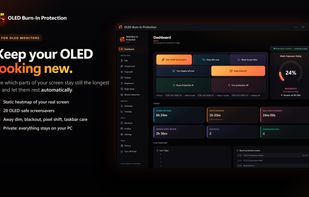
Protects OLED monitors from burn-in with a live static-screen heatmap, OLED screensavers, idle dimming, pixel shift and taskbar dimming, Camera presence detection — like flagship OLED monitors.
OLED Burn-In Protection screenshot 1

Cost / License

  • Pay once
  • Proprietary

Application type

Platforms

  • Windows
0likes
0articles
Save

Features

Properties

Features

Highlights All activities

OLED Burn-In Protection News & Activities

Recent activities

OLED Burn-In Protection information

  • Developed by

    GB flagWEEDSEE.COM
  • Licensing

    Proprietary and Commercial product.
  • Pricing

    One time purchase (perpetual license) that costs $9.
  • Alternatives

    16 alternatives listed
  • Badge

    Get an embeddable badge for OLED Burn-In Protection
  • Supported Languages

    • English
    • Arabic
    • Bengali
    • Bulgarian
    • Catalan; Valencian
    • Chinese
    • Croatian
    • Czech
    • Danish
    • Dutch
    • Tagalog
    • Finnish
    • French
    • German
    • Greek
    • Hindi
    • Hungarian
    • Indonesian
    • Italian
    • Japanese
    • Korean
    • Malay
    • Norwegian Bokmål
    • Persian
    • Polish
    • Portuguese
    • Romanian
    • Russian
    • Serbian
    • Slovak
    • Spanish
    • Swedish
    • Thai
    • Turkish
    • Ukrainian
    • Urdu
    • Vietnamese

AlternativeTo Category

OS & Utilities
OLED Burn-In Protection was added to AlternativeTo by Czopp on and this page was last updated .

No comments or reviews, maybe you want to be first?

What is OLED Burn-In Protection?

OLED Burn-In Protection is a Windows app that helps your OLED monitor last longer. Parts of the screen that show the same image for hours, such as a taskbar, a game HUD, a sidebar or a logo, wear faster than the rest. The app shows you where that happens and quietly reduces it.

Key features

  • Static Heatmap: a live map of the screen areas that stay unchanged the longest, with daily statistics, history and an HTML report.
  • Idle protection: after a few idle minutes it can dim the screen, start an OLED screensaver, black out the screen or turn the display off. It waits while video or music plays and never interrupts full-screen games or films.
  • 20 OLED-safe screensavers: Fireworks, Jellyfish, Kaleidoscope, Neon Waves, Digital Rain, Game of Life and more. They are mostly black, always moving and slowly changing colour.
  • Pixel shift: moves windows a few pixels now and then, so static edges land on different pixels.
  • Taskbar dimming and Taskbar Guard: darkens the taskbar or hides it when it has stood still too long.
  • Per-app profiles: pause or relax protection for games, video players and streaming software.
  • Night Read: a dimmer, warmer screen for evening reading, on a schedule or from sunset.
  • Brightness schedule: sets the monitor’s own brightness (DDC/CI) for day, evening and night.
  • Picture adjustments: brightness, contrast and colour, with looks such as Deep black and Invert brightness.
  • Optional camera presence detection: off by default. It notices when the room is empty and protects the screen sooner. Each frame is reduced in memory to a 32×18 brightness grid, and no image is ever saved or sent.
  • Multi-monitor support, global hotkeys, a shutdown timer, tray control and 38 languages.

Private and local There is no account, no cloud, no ads and no telemetry. Screen analysis runs only on your PC and stores statistics, never screenshots.
