OKF Todo is a free, open-source Windows desktop application for turning existing work material into a task plan with an AI assistant, then managing the resulting tasks locally. It is designed for development and support work, including investigations, support cases, deployment checks, notes, and follow-up tasks.
Start with a spreadsheet, screenshots, emails, or other material your assistant can read. Ask it to propose tasks and checklists, review and correct the plan, then approve saving it in OKF Todo. The assistant interprets the source material; OKF Todo keeps the tasks, supporting information, and progress available for continued work.
OKF Todo uses Open Knowledge Format (OKF) to give an external assistant structured context about the task system and its rules. An optional Model Context Protocol (MCP) server lets compatible assistants read, create, and update tasks through the application's services. The built-in Help provides setup instructions, ready-to-copy prompts, and configuration details for the current installation.
The desktop application also works offline without an AI assistant or a hosted account. Its task-management features include:
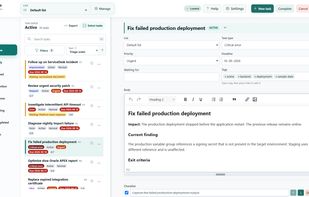
- Task lists, tags, priorities, deadlines, and waiting targets.
- Views for ready, urgent, waiting, overdue, and completed work.
- Rich-text and Markdown editing, with images in task descriptions.
- Checklists with progress visible in the task list.
- File attachments and relationships between tasks.
- Comments and an automatic history of task changes.
- Configurable task types, priorities, and statuses.
- Light and dark themes.
- Built-in database backup and restore.
Tasks, images, attachments, and history are stored together in a local SQLite database. There is no application telemetry, cloud synchronization, or multi-user collaboration.
AI-assisted planning requires a separate assistant with suitable file-reading and local-tool capabilities. OKF Todo does not include an AI model or automatically import spreadsheets and email. Any external AI service has its own account requirements, costs, and data-handling policies.
Packaged installation is available for Windows.





 EU



 Søren Dalby


No comments or reviews, maybe you want to be first?