Offsend is a free, open-source browser extension that catches sensitive data in your AI prompts before you hit send — and masks it locally, on your device.
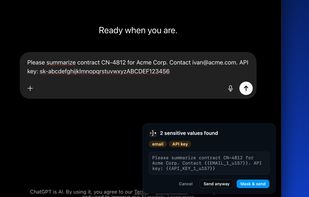
As you type or paste into a web AI chat, Offsend scans your prompt (and text-like attachments) for API keys, access tokens, private keys, database URLs with passwords, credit card numbers, IBANs, email addresses, phone numbers, IP addresses, and other secrets. When something is found, you choose: mask it, send anyway, or cancel. Nothing sensitive? Offsend stays completely out of the way.
Masked values are replaced with stable placeholders like {{API_KEY_1}}, so your prompt still makes sense to the AI. A one-click Restore brings the originals back in the conversation — the mappings are stored encrypted (AES-GCM) in your browser, for a limited time, and never leave your device.
Local-first by design:
• Scanning, masking, and restore all run on your machine — there is no Offsend account and no cloud scan API
• No prompt content, findings, or site names are ever sent anywhere; the only optional network signal is one anonymous "active install" ping per day, which you can turn off
• Minimal permissions: storage, alarms, and access only to the AI sites it protects
• The source code is public (Apache-2.0), and automated tests verify that secrets never appear in network traffic
Supported AI chats: ChatGPT, Claude, Gemini, DeepSeek, Perplexity, Grok, and Microsoft Copilot.
Key features:
• Live highlighting of sensitive values as you type, with a summary of what will be masked on send
• Scans text attachments (source code, CSV, JSON, documents) before upload; honestly labels file types it cannot inspect instead of pretending they were checked
• Three modes: warn, auto-mask, or block sending until values are masked
• Custom detection rules: add your own regex patterns for company-specific secrets
• Optional on-device Smart PII for names, organizations, and addresses that patterns miss (off by default, nothing downloaded or uploaded)
• Trusted values and site allowlist, plus export/import of your masking policy to share settings across a team
• Interface in English, German, Spanish, French, Portuguese, and Russian
Offsend is built for developers, teams, and anyone who pastes real work — code, logs, configs, customer data — into AI chats and wants a safety net that never sends that data anywhere else first.








 Mauricio B. Holguin added Offsend as alternative to Arceris AI Security Gateway
 Simon Hudishkin added Offsend as alternative to Velum Privacy, SafePaste AI, Safe Privacy Mask, Pii Blocker and 1 more





No comments or reviews, maybe you want to be first?