Obs Lite icon
Obs Lite icon

Obs Lite

 Like

Lightweight screen recorder for Windows and Linux with an OBS Studio–style interface: hardware H.264 to MP4, desktop audio and mic, replay buffer, global hotkeys. Unofficial; not affiliated with OBS Studio.
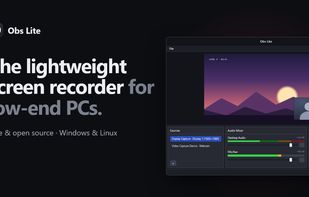
Obs Lite screenshot 1

Cost / License

  • Free
  • Open Source (MIT)

Since

  • New

GitHub

  • GitHub stars: 50

Platforms

  • Windows
  • Linux
0likes
0articles
Save

Features

Properties

Features

Highlights All activities

Obs Lite News & Activities

Recent activities

Obs Lite information

  • Developed by

    darkk
  • Licensing

    Open Source (MIT) and Free product.
  • Written in

  • Alternatives

    9 alternatives listed
  • Badge

    Get an embeddable badge for Obs Lite
  • Supported Languages

    • English
    • Spanish
    • German
    • French
    • Italian
    • Polish
    • Russian
    • Japanese
    • Chinese

AlternativeTo Category

Audio & Music

GitHub repository

  •  50 Stars
  •  4 Forks
  •  0 Open Issues
  •   Updated  
View on GitHub
Obs Lite was added to AlternativeTo by 25Darkk on and this page was last updated .

No comments or reviews, maybe you want to be first?

Official Links

What is Obs Lite?

Obs Lite is a screen recorder that does one thing, record, and leaves out what would need a much larger program. The interface follows OBS Studio (preview, Sources, Audio Mixer and Controls docks, same wording), so OBS users find everything where they expect it.

It hands the encoding to the graphics card (NVENC, Quick Sync, AMF or VA-API), so it stays light on CPU and memory: a 3.1 MB download on Windows, about 100 MB of memory with the preview running, and a 3.7 MB Flatpak on Linux (OBS Studio's is 225 MB).

Features:

  • Record a display, a window or a region of either, with desktop audio and microphone
  • Application audio capture: record a game without your Discord call (Windows)
  • Replay buffer and screenshots
  • One webcam overlay, anywhere on the recording, any size
  • Microphone noise suppression (RNNoise) and a limiter that prevents distortion
  • Recordings survive a crash or power cut (fragmented MP4, repaired at the next start)
  • Pause, hotkeys, minimize to tray, hide Obs Lite from capture
  • Installer without administrator rights, or a portable zip
  • 10 interface languages
  • No ads, no account, no watermark, no time limit, no telemetry

What it does not do: streaming, scenes, filters or plugins. For those, OBS Studio is the right tool.

Obs Lite is an independent project written in Rust. It contains no OBS code and is not affiliated with the OBS Project.