A portable, open-source, zero-telemetry alternative to the official NVIDIA App. Monitor your GPU and CPU in real time, manage drivers, and tweak key NVIDIA driver settings — no installer, no background services, no account required.
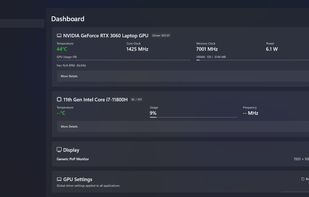
Dashboard:
-Real-time GPU monitoring: temperature, clock speed, usage, power draw, VRAM, fan speed
-Expandable details: hot spot temp, memory junction temp, voltage, power limit, memory controller load, video engine load
-CPU monitoring: package temp, per-core temps/clocks/loads, voltage, power draw, core/thread count
-Display info: connected monitors with resolution, refresh rate, and color depth
-GPU Settings: view and change key global driver settings (Power Management, VSync, Frame Rate Limiter, Low Latency, Threaded Optimization) with one-click restore to defaults
-Quick Actions: launch NVIDIA Control Panel, clear shader cache
-Fahrenheit / Celsius toggle
-Temperature alerts with configurable threshold
-CSV sensor logging for benchmarking and diagnostics
-WMI fallback for CPU temperature when kernel driver access is restricted
Driver Management:
-One-click check for latest Game Ready drivers via NVIDIA's API
-Download with progress tracking and cancel support
-Minimal Install — silent, driver-only install tracked in-app (no NVIDIA UI)
-Express Install — launches NVIDIA's full installer for component selection
-Optional clean install and shader cache clearing
-Driver version history with release notes links
-One-click rollback to previous driver version
-Automatic driver check on startup (configurable)
System:
-System tray with minimize-to-tray support
-Start with Windows option
-Light / Dark / System theme
-Configurable polling interval
-Maximized window state persisted across sessions
-Requires administrator privileges for full sensor access






 foxhead_edu123 added NVLite as alternative to Nvidia App, MSI Afterburner, RadeonTuner and EnvyUpdate


