Numeric Clock icon
Numeric Clock icon

Numeric Clock

 1 like

Free, open-source GNOME Shell extension that shows a numeric date and time in the top bar (DD/MM/YYYY, ISO 8601, 24h or 12h, seconds) on GNOME 45–51, Wayland and X11.
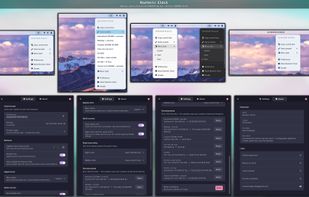
Numeric Clock 17.7: tray menu, presets, menu styles and Preferences

Cost / License

  • Free
  • Open Source (MIT)

Platforms

  • Linux  Requires the GNOME desktop (GNOME Shell 45–51), on Wayland or X11.
  • openSUSE
  • Linux Mint
  • Arch Linux
  • Manjaro Linux
  • Fedora
  • Ubuntu
  • Debian
  • GNOME
1like
0articles
Save

Features

Properties

Features

Highlights All activities

Numeric Clock News & Activities

Recent activities

Numeric Clock information

AlternativeTo Category

OS & Utilities

GitHub repository

  •  1 Stars
  •  0 Forks
  •  1 Open Issues
  •   Updated  
View on GitHub
Numeric Clock was added to AlternativeTo by Nick Otmazgin on and this page was last updated .

No comments or reviews, maybe you want to be first?

What is Numeric Clock?

Numeric Clock is a free, open-source (MIT) GNOME Shell extension that turns the top-bar clock into a clear numeric date and time. Stock GNOME shows "Oct 22 13:17" and has no date-format setting; Numeric Clock shows "22/10/2026 13:17:05" or any other strftime format you like. It runs on GNOME Shell 45 to 51, on Wayland and X11/Xorg.

Formats: DD/MM/YYYY, ISO 8601 (YYYY-MM-DD), US MM/DD/YYYY, 24-hour or 12-hour time, with seconds, weekday or the ISO week number. Eight one-click presets (International, weekday, compact, time only, ISO 8601, ISO date + week number, US 12-hour, top bar only), each with a live sample. The clock ticks exactly on the second, and an invalid or empty format falls back to the default instead of blanking the clock.

Tray icon: left-click opens a quick menu with copy current time, presets, menu style, Preferences, About and Donate. Right-click opens Preferences and middle-click copies the time (both configurable). Hovering the icon shows the time and what each click does. Right-click the clock itself for the same menu; a left-click still opens the GNOME calendar.

Menu style: System (follows the shell theme), Light or Dark.

Preferences: format string with live preview and a built-in list of format codes, update interval, smooth ticking, only-top-bar mode, menu style, panel icon clicks, reset, and an About page.

Privacy: no network access, no telemetry, no account. Restores the stock clock the moment you disable it. Releases are built by GitHub Actions from SSH-signed tags, immutable, and carry a Sigstore build-provenance attestation.

Numeric Clock Videos
