
NotepadXtreme icon
NotepadXtreme icon

NotepadXtreme

A fast, cross-platform text editor with hard-crash recovery for unsaved buffers, infinite local version history, built-in drawing canvas, and AI editing from any provider.
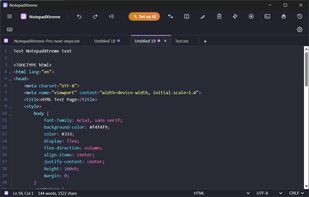
Displaying: UI, syntax highlighting, tabs

Cost / License

  • Freemium (Pay once)
  • Proprietary

Platforms

  • Mac
  • Windows
  • Linux
1like
0articles

Features

Properties

  1.  Lightweight
  2.  Support for Themes
  3.  AI-Powered

Features

  1.  Full-Text Search
  2.  Support for MarkDown
  3.  Dark Mode
  4.  No Tracking
  5.  Syntax Highlighting
  6.  Works Offline
  7.  Extensible by Plugins/Extensions
  8.  No Coding Required
  9.  Ad-free
  10.  No registration required
  11.  Macro Recording
  12.  Support for regular expressions
  13.  Multiple languages
  14.  AI Writing
  15.  Cross-Platform
  16.  Keyboard Shortcuts
  17.  Code Folding
  18.  Compare Text
  19.  Split-screen view

NotepadXtreme News & Activities

Highlights All activities

Recent activities

  • POX reviewed NotepadXtreme  

    There are way better code editors than Notepad++ nowadays, so I don't understand why there are so many vibe-coded clones that are not even 100% free and/or open source… I will never use something like that.

  • stealthf117jm added NotepadXtreme
  • POX updated NotepadXtreme
  • stealthf117jm reviewed NotepadXtreme  

    Finally a Notepad++ replacement that actually works cross-platform without compromising one of the key things that matter...hard crash recovery for unsaved buffers, kill the process, reopen, everything is right there. Local version history, built-in Excalidraw canvas, AI editing with your own key, and it's completely free with no ads, no account, no tracking. The Pro tier is a fair one-time $29 if you want sync and macros. Actively developed. Highly recommended.

  • stealthf117jm liked NotepadXtreme
  • Notepad++ icon
    stealthf117jm added NotepadXtreme as alternative to Notepad++, Visual Studio Code, VSCodium and Sublime Text + 12 similar activities

NotepadXtreme information

  • Developed by

    Syed Aqib
  • Licensing

    Proprietary and Freemium product.
  • Pricing

    One time purchase (perpetual license) that costs $29 + free version with limited functionality.
  • Alternatives

    12 alternatives listed
  • Badge

    Get an embeddable badge for NotepadXtreme
  • Supported Languages

    • English
    • Spanish
    • French
    • German
    • Portuguese
    • Chinese
    • Japanese
    • Hindi
    • Russian
    • Arabic

Our users have written 2 comments and reviews about NotepadXtreme, and it has gotten 1 likes

NotepadXtreme was added to AlternativeTo by Stobz on and this page was last updated .

Comments and Reviews

   
Top Positive Comment
Stobz
0

Finally a Notepad++ replacement that actually works cross-platform without compromising one of the key things that matter...hard crash recovery for unsaved buffers, kill the process, reopen, everything is right there. Local version history, built-in Excalidraw canvas, AI editing with your own key, and it's completely free with no ads, no account, no tracking. The Pro tier is a fair one-time $29 if you want sync and macros. Actively developed. Highly recommended.

Top Negative Comment
Paul
-1

There are way better code editors than Notepad++ nowadays, so I don't understand why there are so many vibe-coded clones that are not even 100% free and/or open source… I will never use something like that.

What is NotepadXtreme?

NotepadXtreme is a free, cross-platform plain text editor for macOS, Windows, and Linux built from one codebase on Tauri 2, React, and CodeMirror 6. It opens instantly to a blank tab, handles 140+ languages with syntax highlighting, and stays fast past 100 MB with a dedicated big-file mode that disables per-keystroke scanners.

The standout feature is session restore of unsaved buffers: quit with untitled unsaved tabs open -- or lose power -- and every buffer comes back exactly as you left it on next launch. Layered on top is infinite local version history stored as compact diffs, so you can drag a timeline slider back to any past state of any file, even ones you never saved.

Core editing includes multi-cursor and column selection, regex find and replace with $1 capture groups, encoding detection and conversion (UTF-8, UTF-16, Latin-1), line-ending control (LF/CRLF/CR), side-by-side tab diff, live Markdown preview, code folding, a resizable folder sidebar, and in-app clipboard history. Six full editor themes -- Monokai, Dracula, Nord, Solarized, light, dark -- plus a System mode that follows your OS automatically.

A full Excalidraw drawing canvas is built in: open a drawing in its own tab or dock a sketchpad beside your text, draw shapes, arrows and freehand, and export as PNG or SVG. Works entirely offline.

AI editing is bring-your-own-key: Anthropic Claude, OpenAI, Google Gemini, xAI Grok, DeepSeek, Mistral, Groq, OpenRouter, or a local Ollama model. Transform selections in plain English, generate regex from a description, summarize files. Your key stays on your device.

Free forever, no ads, no account, no telemetry. Optional one-time Pro ($29) adds cross-device sync of unsaved buffers through your own cloud folder, unlimited version history, macros, external tools, and drawing export.